
Insights
Aug 14, 2026
AI customer service: what it means for your business in 2026
AI customer service: what it means for your business in 2026
Discover how AI customer service can enhance your business by reducing response times, lowering costs, and improving customer interactions in 2026.
Discover how AI customer service can enhance your business by reducing response times, lowering costs, and improving customer interactions in 2026.
AI customer service: what it means for your business in 2026
AI customer service is the use of natural language processing (NLP), machine learning and large language models (LLMs) to automate and improve how businesses handle support conversations across chat, email, voice and messaging. It’s not one tool. It’s a layer of technology sitting between your customer and your team, handling what it can and handing off what it can’t.
The immediate payoff is measurable. Businesses running AI-assisted support typically see faster first response times, broader coverage across time zones, and lower cost per contact once the system is tuned. Genesys frames it well: AI takes on the repetitive, high-volume work like password resets and order tracking, freeing human agents for the complex, high-empathy conversations that actually need a person.
Here’s what businesses adopting AI customer service report:
Faster response times, often cutting first-reply waits from hours to seconds on common queries
24/7 availability without rostering overnight staff
Lower cost per contact once containment rates stabilise
Better ticket routing, so the right query reaches the right agent first go
Personalisation at scale, using account and order history to tailor responses automatically
Key Takeaways
AI customer service works best when it automates well-documented, repetitive queries while keeping humans in the loop for anything involving money, accounts or complaints.
Point | Details |
|---|---|
Start narrow | Pilot on one channel and your most common simple queries first. |
Prioritise data quality | Clean, structured knowledge base content reduces hallucination more effectively than relying on a smarter model alone. |
Keep humans in the loop | Require human sign-off on refunds, account changes and escalations from the start. |
Measure success beyond just containment rates | Pair containment rate with CSAT so you’re not just closing tickets, you’re resolving them well. |
Build with a partner who plans first | Sunstatedigital structures AI systems around your existing CRM and data before writing a single automated response. |
Table of Contents
What sits under the term “AI customer service”?
Where does AI customer service actually get used?
What measurable benefits does AI bring to support?
What are the risks and where does AI customer service fail?
How do you build trustworthy AI into your support team?
Which KPIs actually prove AI customer service is working?
How do you actually roll this out, step by step?
What does a real AI customer service rollout look like?
When should you invest in AI over people and process?
How Sunstatedigital helps you put AI to work in support
Frequently asked questions
Sources
What sits under the term “AI customer service”?
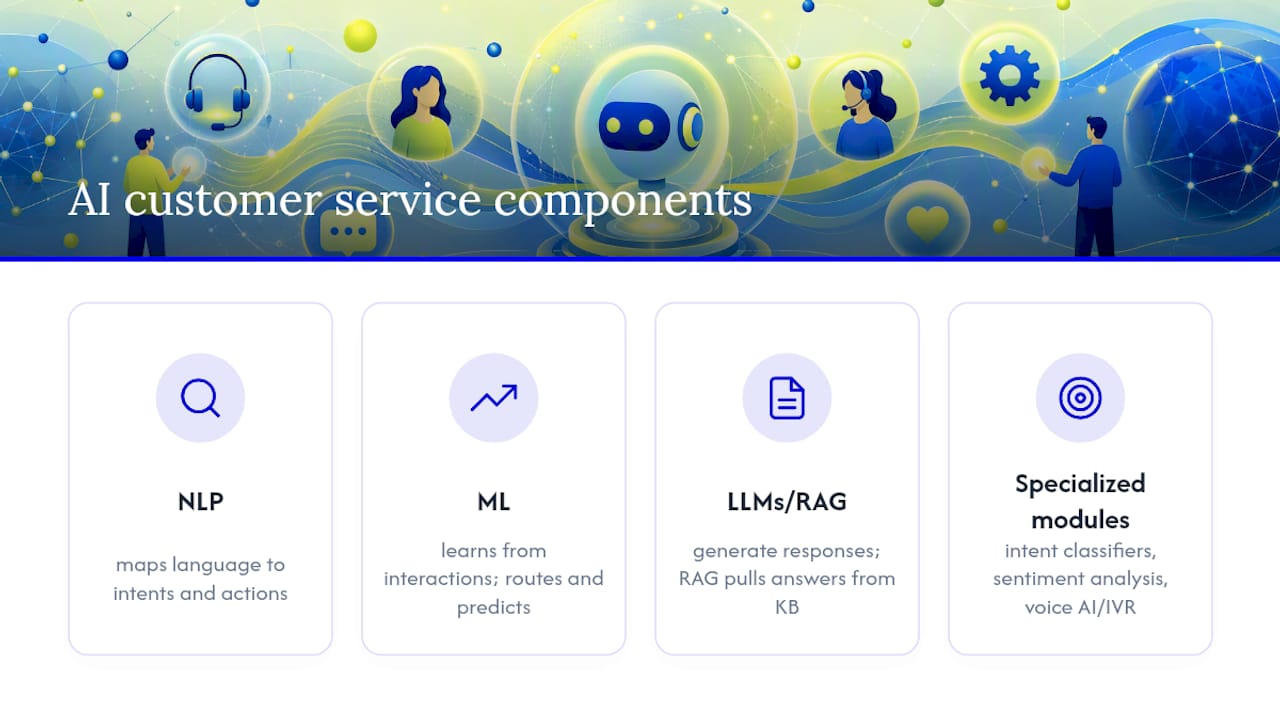
Strip away the marketing language and AI customer service is built from a handful of core technologies, each doing a specific job.
Natural language processing (NLP) is the foundation. It’s what lets a system read “where’s my order” and understand that as an intent, not just a string of words. NLP maps unstructured customer language to structured actions your business can respond to.
Machine learning (ML) sits alongside NLP, learning from past interactions to improve routing decisions and predict which tickets need urgent attention. LLMs like the models powering modern chatbots generate more natural, context-aware responses than the rigid decision-tree bots of a decade ago. Many systems now use retrieval-augmented generation (RAG), which pulls answers directly from your knowledge base rather than relying purely on the model’s trained memory. That matters because RAG reduces the chance of a bot inventing an answer that sounds plausible but is wrong.
Round out the toolkit with intent classifiers (sorting “I want a refund” from “I want to cancel”), sentiment analysis (flagging a frustrated customer before they escalate), and voice AI or IVR for phone-based support.
How it all connects
Picture the flow: a customer opens a chat widget on your website. The message goes to an intent classifier, which checks it against your knowledge base. If there’s a confident match, the AI answers directly. If not, or if sentiment analysis flags frustration, it escalates to a human agent, along with the full conversation context and any CRM data already pulled through.
That CRM connection is what separates a genuinely useful system from a glorified FAQ page. When an AI agent can pull a customer’s order history, subscription status or support history through an API or webhook connection to your helpdesk and CRM, its answers stop being generic and start being useful. Google Cloud’s enterprise CX tooling is built around exactly this idea: connecting commerce and support data so the same agent that answers a shipping question can also see the customer’s order sitting in the warehouse. A poorly connected AI system is just a chatbot with good grammar; a well-connected one is closer to a digital staff member with instant recall.
Where does AI customer service actually get used?
The use cases split cleanly by channel, and each channel has its own strengths and blind spots.
Web chat is the most common entry point, usually the first thing a business automates because it’s low-risk and easy to test. Messaging apps like WhatsApp and Messenger extend that same logic to where customers already are, particularly useful for retail and bookings. Voice AI and IVR handle phone queries, though voice remains harder to get right than text because tone and interruption handling are still catching up to chat-based NLP. Email automation triages and drafts responses to routine queries, while social DMs and in-app support round out an omnichannel setup.
Here’s what these look like in practice:
A retail customer types “where’s my order” into a website chat widget and gets a live tracking number pulled straight from the CRM
A subscriber messages on WhatsApp asking to reset a password, resolved without a human touching the ticket
A customer asks a billing question via email and the AI drafts a response an agent reviews before sending
A prospective client fills in a web form at 11pm and an AI agent qualifies the lead and books a callback slot
A patient or client uses a chatbot to book or reschedule an appointment without calling reception
There’s an important distinction buried in these examples: some of these are actions (processing a refund, booking an appointment, updating an address) and some are just answers (explaining a policy, providing a tracking number). Businesses that get AI customer service wrong often let bots take actions they shouldn’t, like approving a refund without a threshold check. The safer default, at least early on, is to let AI answer freely but require a human sign-off before it acts on anything involving money or account changes.
What measurable benefits does AI bring to support?
The business case for AI customer service usually comes down to five levers: speed, scale, cost, availability and personalisation.
Speed shows up first. Bots answer common queries instantly instead of queuing customers behind a support inbox. Scale follows: a system that handles 50 conversations at once costs the same to run as one handling five. IBM’s overview of customer service automation points out that automated ticketing and ML-based routing reduce wait times by prioritising and directing tickets more efficiently than a human triage queue ever could manage at volume.

Cost per contact tends to fall once containment rates settle, because fewer routine queries need a paid agent’s time. 24/7 availability removes the overnight and weekend staffing problem entirely. And personalisation at scale means every customer gets a response shaped by their own account data, not a copy-pasted script.
How these benefits land depends heavily on business size and goals. A small business chasing lead capture out of hours cares most about not missing an enquiry at 9pm on a Saturday. An enterprise running thousands of daily tickets cares more about shaving seconds off average handle time across a huge base, because that time compounds into real labour cost. If your objective is cost reduction, containment rate is your headline metric. If it’s conversion, response speed and lead qualification quality matter more than how many tickets the bot closes without human help.
What are the risks and where does AI customer service fail?
No system is bulletproof, and pretending otherwise is how businesses end up with an angry customer and a bad review.
Hallucination is the best-known failure mode: an LLM confidently stating something false, like an incorrect refund policy or a made-up delivery date. Incorrect account actions are worse, because they touch money or data, not just information. Privacy and data leakage is a real concern too, particularly when an AI agent has broad access to customer records without proper access controls. Bias can creep in through training data, subtly disadvantaging certain phrasing or customer groups. And there’s the softer risk of losing the human touch, where customers feel processed rather than heard.
The mitigations are practical, not theoretical:
Keep a human-in-the-loop for anything involving refunds, cancellations or account changes
Set confidence thresholds so low-certainty responses route to a person instead of guessing
Apply guardrails that block the AI from discussing topics outside its scope
Practise data minimisation, only exposing the customer data the AI genuinely needs for that interaction
Run structured testing before launch, including edge cases and adversarial prompts
There’s a compliance angle too, and it’s not optional. The ACCC’s guidance on false or misleading claims makes clear that overstating what your AI can do, whether that’s accuracy, availability or capability, carries the same consumer law risk as any other false advertising claim.
It’s also worth putting the “AI replaces jobs” fear in context. Broader economic research into automation’s effects on labour and productivity suggests the picture is more nuanced than wholesale replacement, and the Genesys framing holds up in practice: agent roles shift toward complex, high-empathy work rather than disappearing outright.
How do you build trustworthy AI into your support team?
Governance sounds like a boring word for what’s actually a simple idea: decide who owns what before something goes wrong, not after.

1. Assign clear ownership. You need a data owner (who’s accountable for what customer data the AI can access), a support lead (who owns the customer experience outcomes), an ML owner (who monitors model performance) and a legal or compliance contact (who signs off on what the AI is allowed to say and do).
2. Set escalation rules before launch. Define exactly what the AI can auto-resolve (password resets, order status, FAQ answers) and what must always escalate to a human (refunds above a dollar threshold, complaints, anything involving a vulnerable customer, legal or medical questions).
3. Build the launch checklist. Before going live, you need clean training data, a set of test scenarios covering both common and edge cases, a monitoring dashboard, and an agreed retraining cadence, monthly is a reasonable starting cadence for most small to mid-sized deployments.
4. Prepare your data properly. The single biggest driver of AI accuracy isn’t the model, it’s the quality of what you feed it. Structured, well-organised FAQs and help-centre documents reduce hallucination rates far more than switching to a “smarter” model does.
Pro Tip: Map your top 50 customer queries and label their intents before you build anything. Most businesses skip this step and wonder why their bot gives confident wrong answers, when the real problem is the knowledge base it’s drawing from was never properly structured.
Which KPIs actually prove AI customer service is working?
Six metrics matter, and none of them tell the full story alone.
CSAT (customer satisfaction score) measures whether the customer was actually happy with the interaction, not just whether it was resolved. FCR (first contact resolution) tracks how often a query gets fully resolved without a follow-up. Containment rate (sometimes called deflection rate) is the percentage of conversations the AI resolves without human involvement, useful, but only when read alongside CSAT. A high containment rate paired with falling CSAT usually means the bot is closing tickets it shouldn’t.
Average handle time (AHT) shows how long resolutions take, whether human or AI-assisted. Cost per contact ties the whole exercise back to the budget conversation. Escalation rate tracks how often the AI hands off to a person, and a rising escalation rate over time can be an early warning that the knowledge base needs updating.
Metric | Watch cadence | Sample pilot target (indicative) |
|---|---|---|
CSAT | Weekly | a high customer satisfaction score on AI-assisted conversations |
First contact resolution | Weekly | a moderate to good first contact resolution rate for common query types |
Containment rate | Daily | a reasonable containment rate during the initial pilot period |
Average handle time | Weekly | a noticeable reduction in handling time for routine tickets |
Cost per contact | Monthly | a meaningful reduction in cost per contact after systems stabilize |
Treat these figures as a starting point for your own pilot, not a promise. As IBM’s automation overview notes, ticketing and routing tools are built to reduce wait times and improve workflow efficiency, but the actual numbers you hit depend on your query mix, your knowledge base quality and how well you’ve set escalation rules. Daily monitoring suits containment rate because it shifts fast during a pilot. CSAT and FCR are steadier and suit a weekly review. Cost per contact only stabilises after a few weeks, so check it monthly.
How do you actually roll this out, step by step?
A sensible AI customer service rollout runs three to six months from decision to scaled deployment. Here’s a realistic sequence.
Discover (weeks 1 to 2): Map your current support volume, channel mix and top query types. Identify where the AI in customer support will have the most impact, usually the highest-volume, lowest-complexity queries first.
Prepare data (weeks 2 to 4): Clean and structure your knowledge base. Label intents for your top 50 queries. Define ten concrete escalation scenarios your team agrees on in advance.
Pilot (weeks 4 to 8): Launch on one channel, typically web chat, with a limited scope. Set your success criteria before you start, not after you see the numbers.
Measure (weeks 8 to 10): Track CSAT, FCR and containment rate against your pilot targets. Review every unanswered or escalated query to find gaps in the knowledge base.
Iterate (weeks 10 to 14): Retrain based on what the pilot revealed. Expand intent coverage. Tighten escalation rules where the AI overstepped.
Scale (months 4 to 6): Extend to additional channels, messaging apps, email, voice, once the pilot channel is stable and trusted by the team.
Budget-wise, expect four categories: licensing (the platform or model access itself), integration (connecting to your CRM and helpdesk, often the most underestimated cost), staff time (someone needs to own the knowledge base and monitoring, not just set it and forget it) and ongoing monitoring and retraining. Small businesses often start with lighter integration scope, tighter tool tiers, and can scale up staffing involvement as the pilot proves out. Enterprise deployments typically need dedicated ML and compliance resourcing from day one.
Your pilot checklist should nail down scope (which channel, which query types), success criteria (defined before launch, not adjusted after), sample test cases (including deliberately tricky edge cases) and the data sources feeding the agent (which documents, which CRM fields, which historical tickets).
What does a real AI customer service rollout look like?
A local retail client came to Sunstatedigital wanting to cut response times on order and shipping enquiries without adding headcount over a busy trading period. The objective was narrow by design: automate the highest-volume, lowest-complexity queries first, and measure before expanding.
The deployment connected a chat widget to the client’s existing CRM through the CRM and automation layer already in place, so the AI could pull real order status rather than giving generic shipping estimates. Structured FAQ content was built out before launch, covering the client’s actual top queries rather than a generic template. Escalation rules were set so anything involving a refund or a complaint routed straight to a human, no exceptions.
The result was a meaningful cut in first-response time on routine queries and a noticeable drop in the volume reaching human agents, freeing the team to handle the complaints and edge cases that actually needed a person. The broader AI implementation work documented across other client deployments shows a consistent pattern: the clients who prepare their data properly before launch get better results faster than those who buy a tool and expect it to learn on the fly.
If you’re evaluating an implementation partner for your own rollout, ask them directly: what does their data preparation process look like before launch? What escalation rules do they set as a default? How do they report on CSAT and containment together, rather than containment alone? A partner who can’t answer those clearly hasn’t run enough pilots to know where the failure modes actually are.
When should you invest in AI over people and process?
Here’s where I’ll push back on the industry’s favourite pitch: AI customer service is not a replacement for good process, it’s an amplifier of whatever process you already have. Feed it a messy knowledge base and unclear escalation rules, and you’ll automate your chaos faster, not fix it.
AI solves the problems that are genuinely repetitive and well-documented: order status, password resets, appointment bookings, FAQ answers. It does not solve a broken process, an undocumented policy, or a support team that’s never agreed on what “resolved” actually means. If your team can’t answer “what’s our refund policy for a damaged item” consistently today, no amount of AI will fix that inconsistency, it’ll just automate whichever wrong answer gets picked up first.
A few rules worth following: do map your top queries and clean your knowledge base before you build anything. Do set escalation rules before launch, not after the first bad outcome. Don’t let a bot take financial actions without a human check early on. Don’t treat containment rate as the finish line, treat it as one number among several.
My rule of thumb for resource allocation: if your process is documented and consistent, invest in AI first, it’ll scale that consistency. If your process is still being figured out, invest in people and documentation first, then automate what you’ve learned works.
How Sunstatedigital helps you put AI to work in support
Sunstatedigital is the alternative to hiring a specialist AI vendor and stitching the integration together yourself, we handle the CRM connection, the knowledge base structuring and the escalation logic as one build, not three separate projects.
Our AI systems work sits alongside our CRM and automation services, meaning your support AI can actually see the same customer data your marketing and sales teams already use, rather than operating as an island. We run pilots the same way this article describes them: narrow scope, clear KPIs, human-in-the-loop from day one, because a rushed launch is how businesses end up with the exact hallucination and trust problems covered above.
Clients like Ray White Aspley have seen what happens when strategy comes before spending, cutting lead costs while improving the quality of what actually converts. If you’re weighing up whether AI customer service fits your business, book a strategy session and we’ll map your top queries, your escalation risks and a realistic pilot scope before you commit to anything.
Frequently asked questions
Is AI customer service suitable for a small business, or only enterprise teams? Small businesses often see the fastest wins because the highest-value use case, catching after-hours enquiries and answering common questions instantly, needs no complex integration to deliver value. Start with a single channel and a narrow query set rather than trying to automate everything at once.
How long does it take to see results from an AI customer support pilot? Most pilots show measurable movement in containment rate and response times within four to eight weeks, though CSAT and cost-per-contact figures usually take longer to stabilise as the knowledge base gets refined.
Will AI replace human customer service agents? The evidence points toward role change rather than replacement. AI absorbs repetitive, well-documented queries, while agents shift toward complaints, complex account issues and situations that need genuine empathy.
What’s the difference between containment rate and customer satisfaction? Containment rate measures how many conversations the AI resolves without a human. CSAT measures whether the customer was actually happy with that resolution. A high containment rate with falling CSAT is a warning sign, not a win.
Do I need a large IT team to implement AI customer service? Not necessarily. Many deployments connect through existing CRM and helpdesk integrations rather than custom engineering, though you do need someone who owns the knowledge base quality and monitors escalations on an ongoing basis.
Sources
Recommended
Stay Inspired
Get fresh design insights, articles, and resources delivered straight to your inbox.
Latest Blogs



Stay Inspired
Get fresh design insights, articles, and resources delivered straight to your inbox.
Insights
Aug 14, 2026
AI customer service: what it means for your business in 2026
AI customer service: what it means for your business in 2026
Discover how AI customer service can enhance your business by reducing response times, lowering costs, and improving customer interactions in 2026.
Discover how AI customer service can enhance your business by reducing response times, lowering costs, and improving customer interactions in 2026.
AI customer service: what it means for your business in 2026
AI customer service is the use of natural language processing (NLP), machine learning and large language models (LLMs) to automate and improve how businesses handle support conversations across chat, email, voice and messaging. It’s not one tool. It’s a layer of technology sitting between your customer and your team, handling what it can and handing off what it can’t.
The immediate payoff is measurable. Businesses running AI-assisted support typically see faster first response times, broader coverage across time zones, and lower cost per contact once the system is tuned. Genesys frames it well: AI takes on the repetitive, high-volume work like password resets and order tracking, freeing human agents for the complex, high-empathy conversations that actually need a person.
Here’s what businesses adopting AI customer service report:
Faster response times, often cutting first-reply waits from hours to seconds on common queries
24/7 availability without rostering overnight staff
Lower cost per contact once containment rates stabilise
Better ticket routing, so the right query reaches the right agent first go
Personalisation at scale, using account and order history to tailor responses automatically
Key Takeaways
AI customer service works best when it automates well-documented, repetitive queries while keeping humans in the loop for anything involving money, accounts or complaints.
Point | Details |
|---|---|
Start narrow | Pilot on one channel and your most common simple queries first. |
Prioritise data quality | Clean, structured knowledge base content reduces hallucination more effectively than relying on a smarter model alone. |
Keep humans in the loop | Require human sign-off on refunds, account changes and escalations from the start. |
Measure success beyond just containment rates | Pair containment rate with CSAT so you’re not just closing tickets, you’re resolving them well. |
Build with a partner who plans first | Sunstatedigital structures AI systems around your existing CRM and data before writing a single automated response. |
Table of Contents
What sits under the term “AI customer service”?
Where does AI customer service actually get used?
What measurable benefits does AI bring to support?
What are the risks and where does AI customer service fail?
How do you build trustworthy AI into your support team?
Which KPIs actually prove AI customer service is working?
How do you actually roll this out, step by step?
What does a real AI customer service rollout look like?
When should you invest in AI over people and process?
How Sunstatedigital helps you put AI to work in support
Frequently asked questions
Sources
What sits under the term “AI customer service”?
Strip away the marketing language and AI customer service is built from a handful of core technologies, each doing a specific job.
Natural language processing (NLP) is the foundation. It’s what lets a system read “where’s my order” and understand that as an intent, not just a string of words. NLP maps unstructured customer language to structured actions your business can respond to.
Machine learning (ML) sits alongside NLP, learning from past interactions to improve routing decisions and predict which tickets need urgent attention. LLMs like the models powering modern chatbots generate more natural, context-aware responses than the rigid decision-tree bots of a decade ago. Many systems now use retrieval-augmented generation (RAG), which pulls answers directly from your knowledge base rather than relying purely on the model’s trained memory. That matters because RAG reduces the chance of a bot inventing an answer that sounds plausible but is wrong.
Round out the toolkit with intent classifiers (sorting “I want a refund” from “I want to cancel”), sentiment analysis (flagging a frustrated customer before they escalate), and voice AI or IVR for phone-based support.
How it all connects
Picture the flow: a customer opens a chat widget on your website. The message goes to an intent classifier, which checks it against your knowledge base. If there’s a confident match, the AI answers directly. If not, or if sentiment analysis flags frustration, it escalates to a human agent, along with the full conversation context and any CRM data already pulled through.
That CRM connection is what separates a genuinely useful system from a glorified FAQ page. When an AI agent can pull a customer’s order history, subscription status or support history through an API or webhook connection to your helpdesk and CRM, its answers stop being generic and start being useful. Google Cloud’s enterprise CX tooling is built around exactly this idea: connecting commerce and support data so the same agent that answers a shipping question can also see the customer’s order sitting in the warehouse. A poorly connected AI system is just a chatbot with good grammar; a well-connected one is closer to a digital staff member with instant recall.
Where does AI customer service actually get used?
The use cases split cleanly by channel, and each channel has its own strengths and blind spots.
Web chat is the most common entry point, usually the first thing a business automates because it’s low-risk and easy to test. Messaging apps like WhatsApp and Messenger extend that same logic to where customers already are, particularly useful for retail and bookings. Voice AI and IVR handle phone queries, though voice remains harder to get right than text because tone and interruption handling are still catching up to chat-based NLP. Email automation triages and drafts responses to routine queries, while social DMs and in-app support round out an omnichannel setup.
Here’s what these look like in practice:
A retail customer types “where’s my order” into a website chat widget and gets a live tracking number pulled straight from the CRM
A subscriber messages on WhatsApp asking to reset a password, resolved without a human touching the ticket
A customer asks a billing question via email and the AI drafts a response an agent reviews before sending
A prospective client fills in a web form at 11pm and an AI agent qualifies the lead and books a callback slot
A patient or client uses a chatbot to book or reschedule an appointment without calling reception
There’s an important distinction buried in these examples: some of these are actions (processing a refund, booking an appointment, updating an address) and some are just answers (explaining a policy, providing a tracking number). Businesses that get AI customer service wrong often let bots take actions they shouldn’t, like approving a refund without a threshold check. The safer default, at least early on, is to let AI answer freely but require a human sign-off before it acts on anything involving money or account changes.
What measurable benefits does AI bring to support?
The business case for AI customer service usually comes down to five levers: speed, scale, cost, availability and personalisation.
Speed shows up first. Bots answer common queries instantly instead of queuing customers behind a support inbox. Scale follows: a system that handles 50 conversations at once costs the same to run as one handling five. IBM’s overview of customer service automation points out that automated ticketing and ML-based routing reduce wait times by prioritising and directing tickets more efficiently than a human triage queue ever could manage at volume.
Cost per contact tends to fall once containment rates settle, because fewer routine queries need a paid agent’s time. 24/7 availability removes the overnight and weekend staffing problem entirely. And personalisation at scale means every customer gets a response shaped by their own account data, not a copy-pasted script.
How these benefits land depends heavily on business size and goals. A small business chasing lead capture out of hours cares most about not missing an enquiry at 9pm on a Saturday. An enterprise running thousands of daily tickets cares more about shaving seconds off average handle time across a huge base, because that time compounds into real labour cost. If your objective is cost reduction, containment rate is your headline metric. If it’s conversion, response speed and lead qualification quality matter more than how many tickets the bot closes without human help.
What are the risks and where does AI customer service fail?
No system is bulletproof, and pretending otherwise is how businesses end up with an angry customer and a bad review.
Hallucination is the best-known failure mode: an LLM confidently stating something false, like an incorrect refund policy or a made-up delivery date. Incorrect account actions are worse, because they touch money or data, not just information. Privacy and data leakage is a real concern too, particularly when an AI agent has broad access to customer records without proper access controls. Bias can creep in through training data, subtly disadvantaging certain phrasing or customer groups. And there’s the softer risk of losing the human touch, where customers feel processed rather than heard.
The mitigations are practical, not theoretical:
Keep a human-in-the-loop for anything involving refunds, cancellations or account changes
Set confidence thresholds so low-certainty responses route to a person instead of guessing
Apply guardrails that block the AI from discussing topics outside its scope
Practise data minimisation, only exposing the customer data the AI genuinely needs for that interaction
Run structured testing before launch, including edge cases and adversarial prompts
There’s a compliance angle too, and it’s not optional. The ACCC’s guidance on false or misleading claims makes clear that overstating what your AI can do, whether that’s accuracy, availability or capability, carries the same consumer law risk as any other false advertising claim.
It’s also worth putting the “AI replaces jobs” fear in context. Broader economic research into automation’s effects on labour and productivity suggests the picture is more nuanced than wholesale replacement, and the Genesys framing holds up in practice: agent roles shift toward complex, high-empathy work rather than disappearing outright.
How do you build trustworthy AI into your support team?
Governance sounds like a boring word for what’s actually a simple idea: decide who owns what before something goes wrong, not after.
1. Assign clear ownership. You need a data owner (who’s accountable for what customer data the AI can access), a support lead (who owns the customer experience outcomes), an ML owner (who monitors model performance) and a legal or compliance contact (who signs off on what the AI is allowed to say and do).
2. Set escalation rules before launch. Define exactly what the AI can auto-resolve (password resets, order status, FAQ answers) and what must always escalate to a human (refunds above a dollar threshold, complaints, anything involving a vulnerable customer, legal or medical questions).
3. Build the launch checklist. Before going live, you need clean training data, a set of test scenarios covering both common and edge cases, a monitoring dashboard, and an agreed retraining cadence, monthly is a reasonable starting cadence for most small to mid-sized deployments.
4. Prepare your data properly. The single biggest driver of AI accuracy isn’t the model, it’s the quality of what you feed it. Structured, well-organised FAQs and help-centre documents reduce hallucination rates far more than switching to a “smarter” model does.
Pro Tip: Map your top 50 customer queries and label their intents before you build anything. Most businesses skip this step and wonder why their bot gives confident wrong answers, when the real problem is the knowledge base it’s drawing from was never properly structured.
Which KPIs actually prove AI customer service is working?
Six metrics matter, and none of them tell the full story alone.
CSAT (customer satisfaction score) measures whether the customer was actually happy with the interaction, not just whether it was resolved. FCR (first contact resolution) tracks how often a query gets fully resolved without a follow-up. Containment rate (sometimes called deflection rate) is the percentage of conversations the AI resolves without human involvement, useful, but only when read alongside CSAT. A high containment rate paired with falling CSAT usually means the bot is closing tickets it shouldn’t.
Average handle time (AHT) shows how long resolutions take, whether human or AI-assisted. Cost per contact ties the whole exercise back to the budget conversation. Escalation rate tracks how often the AI hands off to a person, and a rising escalation rate over time can be an early warning that the knowledge base needs updating.
Metric | Watch cadence | Sample pilot target (indicative) |
|---|---|---|
CSAT | Weekly | a high customer satisfaction score on AI-assisted conversations |
First contact resolution | Weekly | a moderate to good first contact resolution rate for common query types |
Containment rate | Daily | a reasonable containment rate during the initial pilot period |
Average handle time | Weekly | a noticeable reduction in handling time for routine tickets |
Cost per contact | Monthly | a meaningful reduction in cost per contact after systems stabilize |
Treat these figures as a starting point for your own pilot, not a promise. As IBM’s automation overview notes, ticketing and routing tools are built to reduce wait times and improve workflow efficiency, but the actual numbers you hit depend on your query mix, your knowledge base quality and how well you’ve set escalation rules. Daily monitoring suits containment rate because it shifts fast during a pilot. CSAT and FCR are steadier and suit a weekly review. Cost per contact only stabilises after a few weeks, so check it monthly.
How do you actually roll this out, step by step?
A sensible AI customer service rollout runs three to six months from decision to scaled deployment. Here’s a realistic sequence.
Discover (weeks 1 to 2): Map your current support volume, channel mix and top query types. Identify where the AI in customer support will have the most impact, usually the highest-volume, lowest-complexity queries first.
Prepare data (weeks 2 to 4): Clean and structure your knowledge base. Label intents for your top 50 queries. Define ten concrete escalation scenarios your team agrees on in advance.
Pilot (weeks 4 to 8): Launch on one channel, typically web chat, with a limited scope. Set your success criteria before you start, not after you see the numbers.
Measure (weeks 8 to 10): Track CSAT, FCR and containment rate against your pilot targets. Review every unanswered or escalated query to find gaps in the knowledge base.
Iterate (weeks 10 to 14): Retrain based on what the pilot revealed. Expand intent coverage. Tighten escalation rules where the AI overstepped.
Scale (months 4 to 6): Extend to additional channels, messaging apps, email, voice, once the pilot channel is stable and trusted by the team.
Budget-wise, expect four categories: licensing (the platform or model access itself), integration (connecting to your CRM and helpdesk, often the most underestimated cost), staff time (someone needs to own the knowledge base and monitoring, not just set it and forget it) and ongoing monitoring and retraining. Small businesses often start with lighter integration scope, tighter tool tiers, and can scale up staffing involvement as the pilot proves out. Enterprise deployments typically need dedicated ML and compliance resourcing from day one.
Your pilot checklist should nail down scope (which channel, which query types), success criteria (defined before launch, not adjusted after), sample test cases (including deliberately tricky edge cases) and the data sources feeding the agent (which documents, which CRM fields, which historical tickets).
What does a real AI customer service rollout look like?
A local retail client came to Sunstatedigital wanting to cut response times on order and shipping enquiries without adding headcount over a busy trading period. The objective was narrow by design: automate the highest-volume, lowest-complexity queries first, and measure before expanding.
The deployment connected a chat widget to the client’s existing CRM through the CRM and automation layer already in place, so the AI could pull real order status rather than giving generic shipping estimates. Structured FAQ content was built out before launch, covering the client’s actual top queries rather than a generic template. Escalation rules were set so anything involving a refund or a complaint routed straight to a human, no exceptions.
The result was a meaningful cut in first-response time on routine queries and a noticeable drop in the volume reaching human agents, freeing the team to handle the complaints and edge cases that actually needed a person. The broader AI implementation work documented across other client deployments shows a consistent pattern: the clients who prepare their data properly before launch get better results faster than those who buy a tool and expect it to learn on the fly.
If you’re evaluating an implementation partner for your own rollout, ask them directly: what does their data preparation process look like before launch? What escalation rules do they set as a default? How do they report on CSAT and containment together, rather than containment alone? A partner who can’t answer those clearly hasn’t run enough pilots to know where the failure modes actually are.
When should you invest in AI over people and process?
Here’s where I’ll push back on the industry’s favourite pitch: AI customer service is not a replacement for good process, it’s an amplifier of whatever process you already have. Feed it a messy knowledge base and unclear escalation rules, and you’ll automate your chaos faster, not fix it.
AI solves the problems that are genuinely repetitive and well-documented: order status, password resets, appointment bookings, FAQ answers. It does not solve a broken process, an undocumented policy, or a support team that’s never agreed on what “resolved” actually means. If your team can’t answer “what’s our refund policy for a damaged item” consistently today, no amount of AI will fix that inconsistency, it’ll just automate whichever wrong answer gets picked up first.
A few rules worth following: do map your top queries and clean your knowledge base before you build anything. Do set escalation rules before launch, not after the first bad outcome. Don’t let a bot take financial actions without a human check early on. Don’t treat containment rate as the finish line, treat it as one number among several.
My rule of thumb for resource allocation: if your process is documented and consistent, invest in AI first, it’ll scale that consistency. If your process is still being figured out, invest in people and documentation first, then automate what you’ve learned works.
How Sunstatedigital helps you put AI to work in support
Sunstatedigital is the alternative to hiring a specialist AI vendor and stitching the integration together yourself, we handle the CRM connection, the knowledge base structuring and the escalation logic as one build, not three separate projects.
Our AI systems work sits alongside our CRM and automation services, meaning your support AI can actually see the same customer data your marketing and sales teams already use, rather than operating as an island. We run pilots the same way this article describes them: narrow scope, clear KPIs, human-in-the-loop from day one, because a rushed launch is how businesses end up with the exact hallucination and trust problems covered above.
Clients like Ray White Aspley have seen what happens when strategy comes before spending, cutting lead costs while improving the quality of what actually converts. If you’re weighing up whether AI customer service fits your business, book a strategy session and we’ll map your top queries, your escalation risks and a realistic pilot scope before you commit to anything.
Frequently asked questions
Is AI customer service suitable for a small business, or only enterprise teams? Small businesses often see the fastest wins because the highest-value use case, catching after-hours enquiries and answering common questions instantly, needs no complex integration to deliver value. Start with a single channel and a narrow query set rather than trying to automate everything at once.
How long does it take to see results from an AI customer support pilot? Most pilots show measurable movement in containment rate and response times within four to eight weeks, though CSAT and cost-per-contact figures usually take longer to stabilise as the knowledge base gets refined.
Will AI replace human customer service agents? The evidence points toward role change rather than replacement. AI absorbs repetitive, well-documented queries, while agents shift toward complaints, complex account issues and situations that need genuine empathy.
What’s the difference between containment rate and customer satisfaction? Containment rate measures how many conversations the AI resolves without a human. CSAT measures whether the customer was actually happy with that resolution. A high containment rate with falling CSAT is a warning sign, not a win.
Do I need a large IT team to implement AI customer service? Not necessarily. Many deployments connect through existing CRM and helpdesk integrations rather than custom engineering, though you do need someone who owns the knowledge base quality and monitors escalations on an ongoing basis.
Sources
Recommended
Stay Inspired
Get fresh design insights, articles, and resources delivered straight to your inbox.
Latest Blogs
Stay Inspired
Get fresh design insights, articles, and resources delivered straight to your inbox.
Insights
Aug 14, 2026
AI customer service: what it means for your business in 2026
AI customer service: what it means for your business in 2026
Discover how AI customer service can enhance your business by reducing response times, lowering costs, and improving customer interactions in 2026.
Discover how AI customer service can enhance your business by reducing response times, lowering costs, and improving customer interactions in 2026.
AI customer service: what it means for your business in 2026
AI customer service is the use of natural language processing (NLP), machine learning and large language models (LLMs) to automate and improve how businesses handle support conversations across chat, email, voice and messaging. It’s not one tool. It’s a layer of technology sitting between your customer and your team, handling what it can and handing off what it can’t.
The immediate payoff is measurable. Businesses running AI-assisted support typically see faster first response times, broader coverage across time zones, and lower cost per contact once the system is tuned. Genesys frames it well: AI takes on the repetitive, high-volume work like password resets and order tracking, freeing human agents for the complex, high-empathy conversations that actually need a person.
Here’s what businesses adopting AI customer service report:
Faster response times, often cutting first-reply waits from hours to seconds on common queries
24/7 availability without rostering overnight staff
Lower cost per contact once containment rates stabilise
Better ticket routing, so the right query reaches the right agent first go
Personalisation at scale, using account and order history to tailor responses automatically
Key Takeaways
AI customer service works best when it automates well-documented, repetitive queries while keeping humans in the loop for anything involving money, accounts or complaints.
Point | Details |
|---|---|
Start narrow | Pilot on one channel and your most common simple queries first. |
Prioritise data quality | Clean, structured knowledge base content reduces hallucination more effectively than relying on a smarter model alone. |
Keep humans in the loop | Require human sign-off on refunds, account changes and escalations from the start. |
Measure success beyond just containment rates | Pair containment rate with CSAT so you’re not just closing tickets, you’re resolving them well. |
Build with a partner who plans first | Sunstatedigital structures AI systems around your existing CRM and data before writing a single automated response. |
Table of Contents
What sits under the term “AI customer service”?
Where does AI customer service actually get used?
What measurable benefits does AI bring to support?
What are the risks and where does AI customer service fail?
How do you build trustworthy AI into your support team?
Which KPIs actually prove AI customer service is working?
How do you actually roll this out, step by step?
What does a real AI customer service rollout look like?
When should you invest in AI over people and process?
How Sunstatedigital helps you put AI to work in support
Frequently asked questions
Sources
What sits under the term “AI customer service”?
Strip away the marketing language and AI customer service is built from a handful of core technologies, each doing a specific job.
Natural language processing (NLP) is the foundation. It’s what lets a system read “where’s my order” and understand that as an intent, not just a string of words. NLP maps unstructured customer language to structured actions your business can respond to.
Machine learning (ML) sits alongside NLP, learning from past interactions to improve routing decisions and predict which tickets need urgent attention. LLMs like the models powering modern chatbots generate more natural, context-aware responses than the rigid decision-tree bots of a decade ago. Many systems now use retrieval-augmented generation (RAG), which pulls answers directly from your knowledge base rather than relying purely on the model’s trained memory. That matters because RAG reduces the chance of a bot inventing an answer that sounds plausible but is wrong.
Round out the toolkit with intent classifiers (sorting “I want a refund” from “I want to cancel”), sentiment analysis (flagging a frustrated customer before they escalate), and voice AI or IVR for phone-based support.
How it all connects
Picture the flow: a customer opens a chat widget on your website. The message goes to an intent classifier, which checks it against your knowledge base. If there’s a confident match, the AI answers directly. If not, or if sentiment analysis flags frustration, it escalates to a human agent, along with the full conversation context and any CRM data already pulled through.
That CRM connection is what separates a genuinely useful system from a glorified FAQ page. When an AI agent can pull a customer’s order history, subscription status or support history through an API or webhook connection to your helpdesk and CRM, its answers stop being generic and start being useful. Google Cloud’s enterprise CX tooling is built around exactly this idea: connecting commerce and support data so the same agent that answers a shipping question can also see the customer’s order sitting in the warehouse. A poorly connected AI system is just a chatbot with good grammar; a well-connected one is closer to a digital staff member with instant recall.
Where does AI customer service actually get used?
The use cases split cleanly by channel, and each channel has its own strengths and blind spots.
Web chat is the most common entry point, usually the first thing a business automates because it’s low-risk and easy to test. Messaging apps like WhatsApp and Messenger extend that same logic to where customers already are, particularly useful for retail and bookings. Voice AI and IVR handle phone queries, though voice remains harder to get right than text because tone and interruption handling are still catching up to chat-based NLP. Email automation triages and drafts responses to routine queries, while social DMs and in-app support round out an omnichannel setup.
Here’s what these look like in practice:
A retail customer types “where’s my order” into a website chat widget and gets a live tracking number pulled straight from the CRM
A subscriber messages on WhatsApp asking to reset a password, resolved without a human touching the ticket
A customer asks a billing question via email and the AI drafts a response an agent reviews before sending
A prospective client fills in a web form at 11pm and an AI agent qualifies the lead and books a callback slot
A patient or client uses a chatbot to book or reschedule an appointment without calling reception
There’s an important distinction buried in these examples: some of these are actions (processing a refund, booking an appointment, updating an address) and some are just answers (explaining a policy, providing a tracking number). Businesses that get AI customer service wrong often let bots take actions they shouldn’t, like approving a refund without a threshold check. The safer default, at least early on, is to let AI answer freely but require a human sign-off before it acts on anything involving money or account changes.
What measurable benefits does AI bring to support?
The business case for AI customer service usually comes down to five levers: speed, scale, cost, availability and personalisation.
Speed shows up first. Bots answer common queries instantly instead of queuing customers behind a support inbox. Scale follows: a system that handles 50 conversations at once costs the same to run as one handling five. IBM’s overview of customer service automation points out that automated ticketing and ML-based routing reduce wait times by prioritising and directing tickets more efficiently than a human triage queue ever could manage at volume.
Cost per contact tends to fall once containment rates settle, because fewer routine queries need a paid agent’s time. 24/7 availability removes the overnight and weekend staffing problem entirely. And personalisation at scale means every customer gets a response shaped by their own account data, not a copy-pasted script.
How these benefits land depends heavily on business size and goals. A small business chasing lead capture out of hours cares most about not missing an enquiry at 9pm on a Saturday. An enterprise running thousands of daily tickets cares more about shaving seconds off average handle time across a huge base, because that time compounds into real labour cost. If your objective is cost reduction, containment rate is your headline metric. If it’s conversion, response speed and lead qualification quality matter more than how many tickets the bot closes without human help.
What are the risks and where does AI customer service fail?
No system is bulletproof, and pretending otherwise is how businesses end up with an angry customer and a bad review.
Hallucination is the best-known failure mode: an LLM confidently stating something false, like an incorrect refund policy or a made-up delivery date. Incorrect account actions are worse, because they touch money or data, not just information. Privacy and data leakage is a real concern too, particularly when an AI agent has broad access to customer records without proper access controls. Bias can creep in through training data, subtly disadvantaging certain phrasing or customer groups. And there’s the softer risk of losing the human touch, where customers feel processed rather than heard.
The mitigations are practical, not theoretical:
Keep a human-in-the-loop for anything involving refunds, cancellations or account changes
Set confidence thresholds so low-certainty responses route to a person instead of guessing
Apply guardrails that block the AI from discussing topics outside its scope
Practise data minimisation, only exposing the customer data the AI genuinely needs for that interaction
Run structured testing before launch, including edge cases and adversarial prompts
There’s a compliance angle too, and it’s not optional. The ACCC’s guidance on false or misleading claims makes clear that overstating what your AI can do, whether that’s accuracy, availability or capability, carries the same consumer law risk as any other false advertising claim.
It’s also worth putting the “AI replaces jobs” fear in context. Broader economic research into automation’s effects on labour and productivity suggests the picture is more nuanced than wholesale replacement, and the Genesys framing holds up in practice: agent roles shift toward complex, high-empathy work rather than disappearing outright.
How do you build trustworthy AI into your support team?
Governance sounds like a boring word for what’s actually a simple idea: decide who owns what before something goes wrong, not after.
1. Assign clear ownership. You need a data owner (who’s accountable for what customer data the AI can access), a support lead (who owns the customer experience outcomes), an ML owner (who monitors model performance) and a legal or compliance contact (who signs off on what the AI is allowed to say and do).
2. Set escalation rules before launch. Define exactly what the AI can auto-resolve (password resets, order status, FAQ answers) and what must always escalate to a human (refunds above a dollar threshold, complaints, anything involving a vulnerable customer, legal or medical questions).
3. Build the launch checklist. Before going live, you need clean training data, a set of test scenarios covering both common and edge cases, a monitoring dashboard, and an agreed retraining cadence, monthly is a reasonable starting cadence for most small to mid-sized deployments.
4. Prepare your data properly. The single biggest driver of AI accuracy isn’t the model, it’s the quality of what you feed it. Structured, well-organised FAQs and help-centre documents reduce hallucination rates far more than switching to a “smarter” model does.
Pro Tip: Map your top 50 customer queries and label their intents before you build anything. Most businesses skip this step and wonder why their bot gives confident wrong answers, when the real problem is the knowledge base it’s drawing from was never properly structured.
Which KPIs actually prove AI customer service is working?
Six metrics matter, and none of them tell the full story alone.
CSAT (customer satisfaction score) measures whether the customer was actually happy with the interaction, not just whether it was resolved. FCR (first contact resolution) tracks how often a query gets fully resolved without a follow-up. Containment rate (sometimes called deflection rate) is the percentage of conversations the AI resolves without human involvement, useful, but only when read alongside CSAT. A high containment rate paired with falling CSAT usually means the bot is closing tickets it shouldn’t.
Average handle time (AHT) shows how long resolutions take, whether human or AI-assisted. Cost per contact ties the whole exercise back to the budget conversation. Escalation rate tracks how often the AI hands off to a person, and a rising escalation rate over time can be an early warning that the knowledge base needs updating.
Metric | Watch cadence | Sample pilot target (indicative) |
|---|---|---|
CSAT | Weekly | a high customer satisfaction score on AI-assisted conversations |
First contact resolution | Weekly | a moderate to good first contact resolution rate for common query types |
Containment rate | Daily | a reasonable containment rate during the initial pilot period |
Average handle time | Weekly | a noticeable reduction in handling time for routine tickets |
Cost per contact | Monthly | a meaningful reduction in cost per contact after systems stabilize |
Treat these figures as a starting point for your own pilot, not a promise. As IBM’s automation overview notes, ticketing and routing tools are built to reduce wait times and improve workflow efficiency, but the actual numbers you hit depend on your query mix, your knowledge base quality and how well you’ve set escalation rules. Daily monitoring suits containment rate because it shifts fast during a pilot. CSAT and FCR are steadier and suit a weekly review. Cost per contact only stabilises after a few weeks, so check it monthly.
How do you actually roll this out, step by step?
A sensible AI customer service rollout runs three to six months from decision to scaled deployment. Here’s a realistic sequence.
Discover (weeks 1 to 2): Map your current support volume, channel mix and top query types. Identify where the AI in customer support will have the most impact, usually the highest-volume, lowest-complexity queries first.
Prepare data (weeks 2 to 4): Clean and structure your knowledge base. Label intents for your top 50 queries. Define ten concrete escalation scenarios your team agrees on in advance.
Pilot (weeks 4 to 8): Launch on one channel, typically web chat, with a limited scope. Set your success criteria before you start, not after you see the numbers.
Measure (weeks 8 to 10): Track CSAT, FCR and containment rate against your pilot targets. Review every unanswered or escalated query to find gaps in the knowledge base.
Iterate (weeks 10 to 14): Retrain based on what the pilot revealed. Expand intent coverage. Tighten escalation rules where the AI overstepped.
Scale (months 4 to 6): Extend to additional channels, messaging apps, email, voice, once the pilot channel is stable and trusted by the team.
Budget-wise, expect four categories: licensing (the platform or model access itself), integration (connecting to your CRM and helpdesk, often the most underestimated cost), staff time (someone needs to own the knowledge base and monitoring, not just set it and forget it) and ongoing monitoring and retraining. Small businesses often start with lighter integration scope, tighter tool tiers, and can scale up staffing involvement as the pilot proves out. Enterprise deployments typically need dedicated ML and compliance resourcing from day one.
Your pilot checklist should nail down scope (which channel, which query types), success criteria (defined before launch, not adjusted after), sample test cases (including deliberately tricky edge cases) and the data sources feeding the agent (which documents, which CRM fields, which historical tickets).
What does a real AI customer service rollout look like?
A local retail client came to Sunstatedigital wanting to cut response times on order and shipping enquiries without adding headcount over a busy trading period. The objective was narrow by design: automate the highest-volume, lowest-complexity queries first, and measure before expanding.
The deployment connected a chat widget to the client’s existing CRM through the CRM and automation layer already in place, so the AI could pull real order status rather than giving generic shipping estimates. Structured FAQ content was built out before launch, covering the client’s actual top queries rather than a generic template. Escalation rules were set so anything involving a refund or a complaint routed straight to a human, no exceptions.
The result was a meaningful cut in first-response time on routine queries and a noticeable drop in the volume reaching human agents, freeing the team to handle the complaints and edge cases that actually needed a person. The broader AI implementation work documented across other client deployments shows a consistent pattern: the clients who prepare their data properly before launch get better results faster than those who buy a tool and expect it to learn on the fly.
If you’re evaluating an implementation partner for your own rollout, ask them directly: what does their data preparation process look like before launch? What escalation rules do they set as a default? How do they report on CSAT and containment together, rather than containment alone? A partner who can’t answer those clearly hasn’t run enough pilots to know where the failure modes actually are.
When should you invest in AI over people and process?
Here’s where I’ll push back on the industry’s favourite pitch: AI customer service is not a replacement for good process, it’s an amplifier of whatever process you already have. Feed it a messy knowledge base and unclear escalation rules, and you’ll automate your chaos faster, not fix it.
AI solves the problems that are genuinely repetitive and well-documented: order status, password resets, appointment bookings, FAQ answers. It does not solve a broken process, an undocumented policy, or a support team that’s never agreed on what “resolved” actually means. If your team can’t answer “what’s our refund policy for a damaged item” consistently today, no amount of AI will fix that inconsistency, it’ll just automate whichever wrong answer gets picked up first.
A few rules worth following: do map your top queries and clean your knowledge base before you build anything. Do set escalation rules before launch, not after the first bad outcome. Don’t let a bot take financial actions without a human check early on. Don’t treat containment rate as the finish line, treat it as one number among several.
My rule of thumb for resource allocation: if your process is documented and consistent, invest in AI first, it’ll scale that consistency. If your process is still being figured out, invest in people and documentation first, then automate what you’ve learned works.
How Sunstatedigital helps you put AI to work in support
Sunstatedigital is the alternative to hiring a specialist AI vendor and stitching the integration together yourself, we handle the CRM connection, the knowledge base structuring and the escalation logic as one build, not three separate projects.
Our AI systems work sits alongside our CRM and automation services, meaning your support AI can actually see the same customer data your marketing and sales teams already use, rather than operating as an island. We run pilots the same way this article describes them: narrow scope, clear KPIs, human-in-the-loop from day one, because a rushed launch is how businesses end up with the exact hallucination and trust problems covered above.
Clients like Ray White Aspley have seen what happens when strategy comes before spending, cutting lead costs while improving the quality of what actually converts. If you’re weighing up whether AI customer service fits your business, book a strategy session and we’ll map your top queries, your escalation risks and a realistic pilot scope before you commit to anything.
Frequently asked questions
Is AI customer service suitable for a small business, or only enterprise teams? Small businesses often see the fastest wins because the highest-value use case, catching after-hours enquiries and answering common questions instantly, needs no complex integration to deliver value. Start with a single channel and a narrow query set rather than trying to automate everything at once.
How long does it take to see results from an AI customer support pilot? Most pilots show measurable movement in containment rate and response times within four to eight weeks, though CSAT and cost-per-contact figures usually take longer to stabilise as the knowledge base gets refined.
Will AI replace human customer service agents? The evidence points toward role change rather than replacement. AI absorbs repetitive, well-documented queries, while agents shift toward complaints, complex account issues and situations that need genuine empathy.
What’s the difference between containment rate and customer satisfaction? Containment rate measures how many conversations the AI resolves without a human. CSAT measures whether the customer was actually happy with that resolution. A high containment rate with falling CSAT is a warning sign, not a win.
Do I need a large IT team to implement AI customer service? Not necessarily. Many deployments connect through existing CRM and helpdesk integrations rather than custom engineering, though you do need someone who owns the knowledge base quality and monitors escalations on an ongoing basis.
Sources
Recommended
Stay Inspired
Get fresh design insights, articles, and resources delivered straight to your inbox.
Latest Blogs
Stay Inspired
Get fresh design insights, articles, and resources delivered straight to your inbox.