
Insights
Aug 29, 2026
Prove Marketing Automation ROI for Small Business in 30–90 Days
Prove Marketing Automation ROI for Small Business in 30–90 Days
Pilot one workflow to stop your biggest lead leak and prove marketing automation ROI for your small business in 30–90 days.
Pilot one workflow to stop your biggest lead leak and prove marketing automation ROI for your small business in 30–90 days.
Prove Marketing Automation ROI for Small Business in 30–90 Days
Yes, marketing automation is worth adopting now, even for a solo operator juggling every job in the business. The single highest-impact first move is connecting lead capture to instant CRM routing, followed by a welcome and nurture email sequence. Pick one workflow and pilot it this week rather than planning a full system rollout.
TL;DR:
Connecting lead capture directly to CRM routing prevents missed opportunities, especially if you currently record leads manually or in spreadsheets.
Implementing a welcome email sequence within five minutes of lead capture significantly increases conversion rates compared to delayed follow-up.
Automating appointment reminders can recover revenue lost to no-shows with minimal setup costs and quick return on investment.
Data accuracy and well-mapped workflows are critical, as poor quality or incomplete automation can lead to customer frustration and lost trust.
A successful pilot should demonstrate rapid setup, seamless system integration, and measurable improvements within four to six weeks to justify scaling efforts.
Table of Contents
What should a small business automate first?
Why does automation matter for a growing business, and what are the limits?
Which tool categories and features actually matter?
How do you choose the right automation solution?
Step-by-step: running your first automation pilot
How do you measure success and what does it cost?
What does real-world automation success actually look like?
Turning your pilot into a repeatable system
When should you DIY automation and when should you call in an agency?
Ready to build a system that actually works for you?
Sources
What should a small business automate first?
Not every automation deserves your attention in month one. Some tasks bleed money and time daily; others barely register. The trick is picking the automation that fixes your biggest leak, not the one with the flashiest dashboard.
Here’s the priority order we recommend to Brisbane and Sunshine Coast clients, ranked by impact-to-effort ratio:
Lead capture and instant CRM routing. Every form submission, phone enquiry, or Facebook Lead Ad should land in your CRM within minutes, not sit in an inbox until someone remembers to check it. LeadsBridge’s research on small business automation shows that syncing ad leads directly into CRMs and email platforms prevents the silent loss of opportunities that never get followed up. If you’re currently copying names from a Facebook form into a spreadsheet, this is a vital starting point.
Welcome and nurture sequences. A new lead who gets an automatic, useful reply within five minutes converts at a dramatically higher rate than one who waits three days for a callback. Set up three to five emails spaced over two weeks: a welcome message, a value piece (a guide, a case study, an FAQ), and a soft offer.
Appointment confirmations and reminders. Trades, clinics, salons, and consultants lose real revenue to no-shows. An automated SMS or email reminder sent before an appointment costs very little to set up and can often quickly recoup the investment.
Behavioural segmentation and follow-up. Once you have basic automation running, add triggers based on what people actually do. Someone who opens every email but never clicks needs different messaging than someone who clicked through to your pricing page and then went quiet.
Social post scheduling and content repurposing. Batch your content once a month, schedule it out, and stop treating social media as a daily fire to put out. Fractl’s work on AI-driven content workflows shows how a single long-form asset, a webinar or blog post, can be broken into a week’s worth of social posts and an email series with minimal manual editing.
How do you choose which of these five to pilot first? Look at where you’re bleeding the most. If leads sit unanswered for hours, start with routing. If your calendar has gaps from no-shows, start with reminders. If you’re creating content but nobody sees it consistently, start with scheduling. Match the automation to the biggest pain points in your processes, rather than what looks exciting in vendor demos.
Why does automation matter for a growing business, and what are the limits?
Automation buys you two things: time and consistency. Forbes’s review of small business task automation tools points out that automating repetitive tasks, like email sequences, social scheduling, and reporting, frees up meaningful staff hours that can go toward strategy instead of admin. That’s the real prize. It’s not that automation replaces your judgement; it removes the grunt work that stops you from using it.
Consistency matters just as much as speed. A human following up leads will forget some, prioritise favourites, and have off days. A well-built automated sequence treats every lead the same way, every time, at the same speed, whether it’s 9am on a Tuesday or 11pm on a Sunday.
But automation has a genuine dark side worth naming honestly:
It amplifies whatever data you feed it. Clean, accurate contact records make automation sing. Messy, duplicated, or outdated records make it send the wrong message to the wrong person at the wrong time, repeatedly, and automatically.
Over-automation breaks the customer experience fast. A prospect who gets five generic emails in three days because two workflows triggered simultaneously will unsubscribe, and possibly complain publicly.
Poorly mapped workflows create dead ends. A lead that falls through a gap between your form and your CRM is worse than no automation at all, because you don’t even know it happened.
Statistic Callout: Automating routine marketing tasks like email follow-ups, social scheduling, and reporting frees up significant time for small teams to focus on strategy instead of manual upkeep, as noted by Forbes’s analysis of small business automation tools.
The lesson: automation compounds. Good data and tight workflows compound into time saved and better conversion. Bad data and sloppy mapping compound into complaints and lost trust. Get the fundamentals right before you scale up.
Which tool categories and features actually matter?
Most small business owners get lost comparing individual products instead of thinking in categories first. Once you understand the categories, choosing a specific tool becomes far easier, because you know what job each piece needs to do.
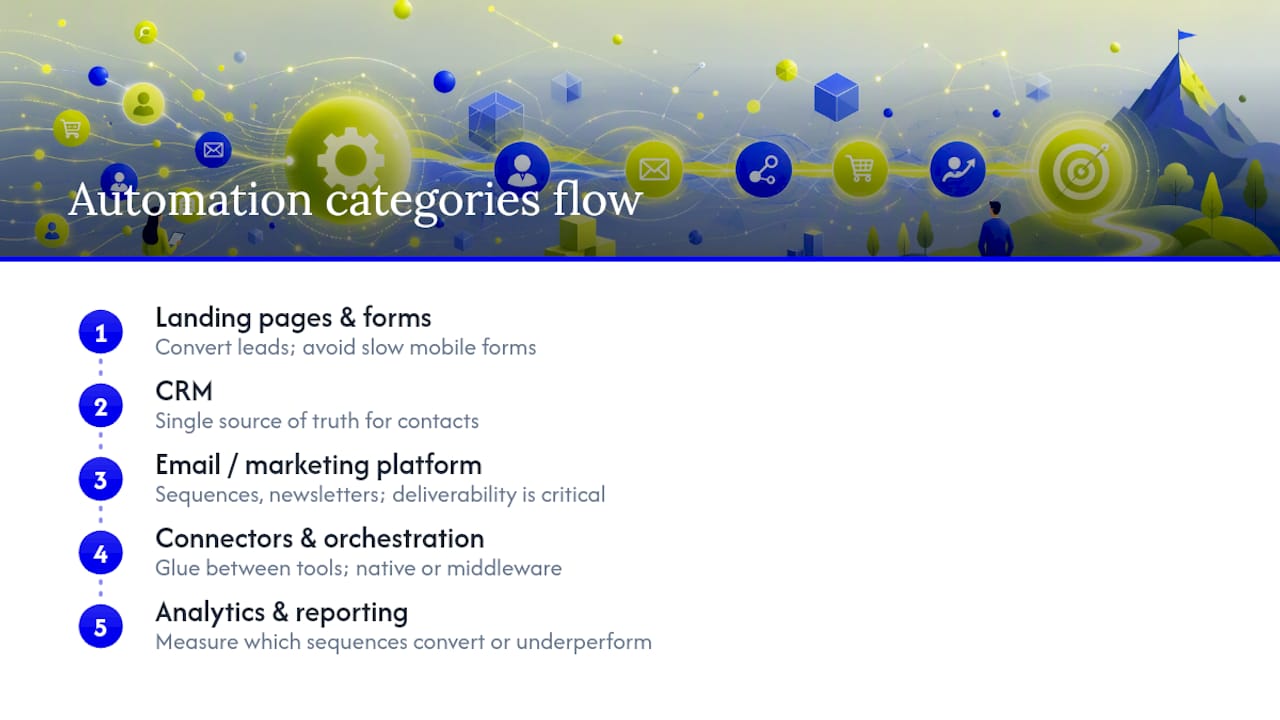
The five categories you need
CRM (customer relationship management). This is your single source of truth for every contact, lead, and customer. If your CRM doesn’t talk to everything else, nothing else matters much.
Email or marketing platform. Handles your sequences, newsletters, and nurture campaigns. Deliverability (whether your emails land in the inbox or the spam folder) is the single most important feature here, ahead of design templates or fancy automation builders.
Landing pages and forms. Where leads actually convert. A clunky, slow-loading form on mobile will cost you leads no matter how good your ad targeting is.
Connectors and orchestration. The glue between tools, whether that’s native integrations built into your CRM or middleware that stitches separate platforms together.
Analytics and reporting. Without this, you’re automating blind. You need to see which sequences convert and which quietly underperform.
The feature checklist for small budgets
When you’re comparing options, run through this list before you sign anything:
Deliverability track record. Ask directly what percentage of sent emails land in the inbox versus spam or promotions tabs.
Contact management depth. Can you tag, segment, and search contacts without needing a technical person?
Visual workflow builder. You should be able to see your automation logic as a flowchart, not buried in settings menus.
Integration options. Does it connect natively to your existing tools, or will you need a third-party connector?
Pricing model clarity. Flat fee, per-contact, or per-automation-run? Know exactly what triggers a price increase before you scale.
Industry momentum is shifting fast here too. ActiveCampaign’s description of “autonomous marketing” points to AI agents that generate, activate, and optimise campaigns across channels with far less manual setup than traditional workflow builders required just a few years ago. That’s worth knowing, because it means the tools available to a five-person business today do things that used to require a marketing team.
Native integrations versus middleware
If your CRM and email platform are built by the same company, or officially partnered, use the native integration every time. It’s more reliable, easier to troubleshoot, and won’t break when one vendor updates their software.
Reach for middleware, tools like Zapier-style connectors, only when you’re bridging platforms that don’t talk to each other natively. Middleware adds a layer of complexity and, often, an extra monthly fee, so treat it as a bridge, not a permanent foundation. A well-designed multi-agent AI workflow can reduce this friction further, coordinating tasks across tools without requiring you to manually rebuild triggers every time something changes upstream.
Pro Tip: Before signing up for any platform, ask for a full contact and workflow export in a standard format like CSV. If they can’t or won’t give you a clean export on request, that’s a data ownership red flag, not a minor inconvenience.
Protecting your data ownership matters more than most owners realise until they try to switch platforms and discover their contact history is trapped. Choose tools that let you export everything, on demand, in a usable format.
How do you choose the right automation solution?
Choosing between platforms doesn’t need to be complicated, but it does need structure. Owners who skip evaluation criteria and just pick whatever a salesperson pushed hardest tend to end up locked into tools that don’t fit how they actually work.
Core evaluation criteria
Score any option you’re considering against these six factors:
Ease of use. Can a non-technical staff member build a basic workflow within a day of training?
Integrations. Does it connect to your existing CRM, website, and ad platforms without custom development?
Onboarding support. Is there a real human who helps you set up your first workflow, or are you left with a knowledge base?
Pricing shape. Flat monthly fee, tiered by contact count, or charged per automation run? Each shape rewards different usage patterns.
Data ownership. Can you export your contacts and workflow logic at any time, without a support ticket?
Reporting depth. Does it show conversion by workflow step, or just top-line opens and clicks?
The 15-minute vendor call checklist
When you’re on a demo call, ask these questions directly and pay close attention to how confidently they’re answered:
“What happens to my data if I cancel?” A vague answer is a warning sign.
“How fast does a new lead get routed into the CRM after form submission?” Anything slower than a few minutes defeats the purpose.
“Can I export my full contact list and workflow logic myself, without support?” This should be a yes, immediately.
“What’s included at this price, and what triggers an upgrade?” Get this in writing, not verbally.
“Do you have a support team, or is documentation the extent of help available?” Checking review sites for support responsiveness before you commit is a smart habit, because onboarding quality varies wildly between vendors, even within the same price bracket.
Red flags that should stop you
Walk away, or at least pause, if you encounter any of these during evaluation:
Hidden fees that only appear once you exceed a contact threshold you weren’t warned about.
No straightforward way to export your own contact data.
Lead routing that takes hours instead of minutes.
Documentation that’s outdated, incomplete, or missing entirely for core features.
The pilot scorecard
Before committing to any platform long-term, run a short pilot and score it against three factors: time to value (how quickly did the first workflow go live and produce a result), technical fit (did it connect to your existing systems without workarounds), and staff load (how much ongoing manual maintenance does it actually require). If your pilot clears all three within four to six weeks, that’s your signal to commit and expand.
Step-by-step: running your first automation pilot
A pilot doesn’t need a project manager or a six-month timeline. It needs a clear scope, a short runway, and someone accountable for checking it actually works.
Audit your current lead sources. List every place a lead currently enters your business: website forms, phone, Facebook ads, walk-ins, referrals. Pick the single highest-volume source as your pilot workflow.
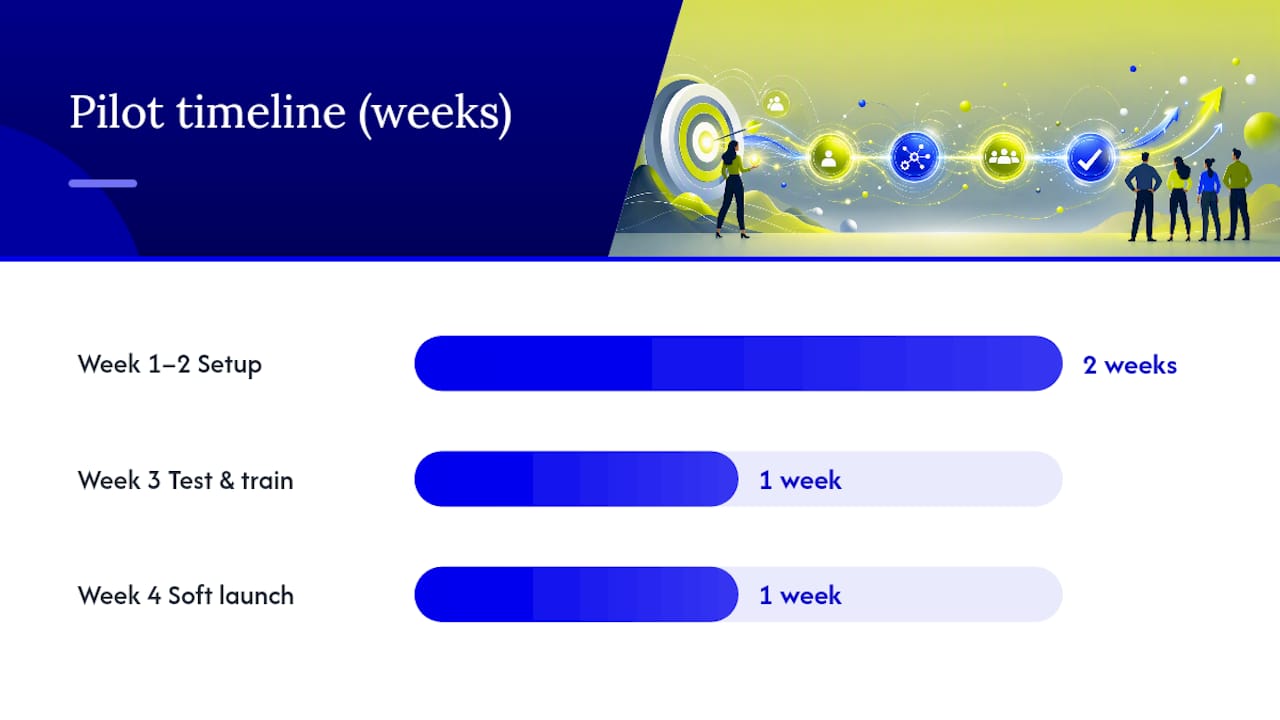
Week 1 to 2: setup and data hygiene. Before building anything, clean your existing contact list. Remove duplicates, fix obvious errors, and standardise how fields like phone numbers and names are entered. Champion Business Coaching’s guidance on process automation makes the case plainly: fix your underlying process before you automate it, because automating a broken process just breaks things faster.
Week 3: test and train. Run test leads through the full workflow yourself. Submit a form, check it lands in the CRM, confirm the welcome email fires within minutes. Train whichever staff member will monitor it on what a normal run looks like versus a broken one.
Week 4: soft launch and monitor daily. Turn it on for real leads, but check it daily for the first week. Watch for leads that don’t route, emails that bounce, or sequences that fire out of order.
Pro Tip: Send yourself a test lead through every entry point (form, phone enquiry, ad click) before going live. If you can’t trace your own test lead through the full workflow within ten minutes, a real customer definitely can’t either.
Before soft launch, run through this testing checklist: confirm emails aren’t landing in spam, confirm form validation catches obvious errors like missing phone numbers, and confirm routing sends leads to the right staff member or inbox, not a generic catch-all.
For a small team, one person should own the pilot end to end, even if they’re not technical. That person’s job is checking the workflow daily during the first month and flagging anything that looks off. Bring in an agency when the workflow needs to connect multiple systems that don’t talk to each other natively, when you don’t have the internal time to monitor it properly, or when the pilot proves valuable and you want to scale it without a slow, trial-and-error build. A content repurposing case study shows how a properly built pipeline, once set up correctly by people who’ve done it before, keeps producing content weeks after the initial setup work is done.
Two triggers tell you it’s time to scale beyond the pilot: your lead volume through that channel has grown enough that manual oversight is becoming a bottleneck, or you’ve measured a genuine conversion improvement and want to replicate the same structure across other lead sources.
How do you measure success and what does it cost?
You can’t manage what you don’t measure, and automation without tracking is just guessing with extra software. Five metrics matter more than the rest combined.
Lead response time measures how long between a lead arriving and a response reaching them, aim for minutes, not hours. Conversion rate tracks what percentage of leads become customers. Cost per lead shows what you’re actually paying, all-in, per lead generated. Revenue per lead connects marketing spend directly to dollars earned. Retention measures whether automated nurture is keeping customers around longer, not just landing the first sale.
Pricing across the market generally falls into three shapes:
Pricing model | How it works | Best suited to |
|---|---|---|
Flat subscription | Fixed monthly fee regardless of usage | Predictable, stable lead volume |
Contact-based tiers | Price increases as your contact list grows | Businesses actively growing their list |
Usage or automation-run fees | Pay per workflow execution or send | Highly variable or seasonal volume |
Realistic timelines matter here too. By day 30, expect your pilot workflow running cleanly with early response-time improvements visible. By day 60, you should see measurable conversion shifts on the pilot channel. By day 90, you’ll have enough data to decide whether to scale the workflow to other lead sources or adjust it further.
A simple ROI formula: (revenue generated from automated leads minus the cost of the tool and setup time) divided by total cost, multiplied by 100. Say your pilot automation costs $150 a month in software and converts an extra three leads a month at an average sale value of $800 each. That’s $2,400 in additional revenue against $150 in cost, a return worth chasing well beyond the pilot stage. Every dollar spent this way should be building something measurable, not just renting attention for a month and starting from zero again next month.
Bullet points for the KPIs worth checking weekly during your pilot:
Response time from lead capture to first contact
Percentage of leads routed correctly without manual intervention
Email open and click rates on your nurture sequence
Number of appointments booked or confirmed automatically
What does real-world automation success actually look like?
Theory is easy. What matters is whether automation produces results you can point to and defend. Working with Ray White Aspley gave us a clear demonstration: tightening lead capture and routing, alongside a broader digital strategy, cut their lead costs significantly by stopping the leakage that happens when enquiries sit unanswered.
Three lessons stand out from running these projects for local businesses:
The biggest wins come from fixing leaks, not adding features. Most businesses lose more value to slow lead response than they’d ever gain from a more elaborate automation build.
Clean data beats clever workflows every time. A simple three-step sequence running on accurate contact data outperforms a sophisticated ten-step workflow running on a messy list.
Small, working pilots earn the trust needed to scale. Owners who see one automation clearly succeed become far more willing to invest in expanding it, compared to owners asked to commit to a full system upfront.
For a closer look at how AI-driven workflows apply to everyday marketing tasks, the case study on practical AI applications walks through real implementation detail rather than theory. Readers wanting hands-on support can also review Sun State Digital’s case studies directly.
Turning your pilot into a repeatable system
Once your first pilot proves itself, the temptation is to automate everything at once. Resist it. The prioritise, pilot, scale sequence works precisely because it forces discipline.
Prioritise by ranking your remaining manual tasks by how often they happen and how much time each one steals. A task you do fifty times a week deserves automation before one you do twice a month, even if the second feels more urgent.
Pilot the next workflow using the same structure that worked the first time: audit, clean data, test with real inputs, soft launch with daily monitoring. Don’t skip the testing phase just because your first pilot went smoothly, every new workflow has its own failure points.
Scale only once you’ve confirmed the new workflow performs on real data for at least two to three weeks. At that point, connect it to your other systems, whether that’s your booking software, your accounting platform, or your advertising accounts, so the whole operation starts reinforcing itself rather than running as disconnected pieces.
The businesses that get the most out of automation treat it as an ongoing practice, not a one-off project. They revisit their workflows quarterly, checking which ones are still earning their place and which have quietly stopped delivering as the business has changed.
When should you DIY automation and when should you call in an agency?
Doing it yourself makes sense for a single, well-scoped pilot, especially lead routing or a basic nurture sequence, where the tools are genuinely simple enough for a business owner to build in an afternoon. Bring in outside help once you’re connecting multiple systems, need workflows that survive staff turnover, or want the kind of AI-driven optimisation that requires ongoing technical oversight. The hybrid approach we recommend most often: build your first pilot in-house to learn what actually matters to your business, then hand the scaling work to specialists once you know exactly what you need automated and why.
— Joshua
Ready to build a system that actually works for you?
Where a traditional agency retainer locks you into months of strategy meetings before anything goes live, Sunstatedigital builds the pilot first and proves it works before you commit further. That’s the difference between paying for promises and paying for results you can measure within weeks, not quarters.
Our CRM and automation service covers exactly what this guide walks through: lead capture, instant routing, nurture sequences, and the integration work that connects it all to your existing systems, without you needing to become a workflow expert yourself. For businesses ready to push further, our AI systems work extends that same automation into intelligent, always-on customer response. If your pilot needs a landing page or form rebuild to convert properly, our website design team handles that groundwork too. Book a free strategy session with Sun State Digital and we’ll map out the single highest-impact automation for your business before you spend a dollar on tools.
Sources
Recommended
Stay Inspired
Get fresh design insights, articles, and resources delivered straight to your inbox.
Latest Blogs



Stay Inspired
Get fresh design insights, articles, and resources delivered straight to your inbox.
Insights
Aug 29, 2026
Prove Marketing Automation ROI for Small Business in 30–90 Days
Prove Marketing Automation ROI for Small Business in 30–90 Days
Pilot one workflow to stop your biggest lead leak and prove marketing automation ROI for your small business in 30–90 days.
Pilot one workflow to stop your biggest lead leak and prove marketing automation ROI for your small business in 30–90 days.
Prove Marketing Automation ROI for Small Business in 30–90 Days
Yes, marketing automation is worth adopting now, even for a solo operator juggling every job in the business. The single highest-impact first move is connecting lead capture to instant CRM routing, followed by a welcome and nurture email sequence. Pick one workflow and pilot it this week rather than planning a full system rollout.
TL;DR:
Connecting lead capture directly to CRM routing prevents missed opportunities, especially if you currently record leads manually or in spreadsheets.
Implementing a welcome email sequence within five minutes of lead capture significantly increases conversion rates compared to delayed follow-up.
Automating appointment reminders can recover revenue lost to no-shows with minimal setup costs and quick return on investment.
Data accuracy and well-mapped workflows are critical, as poor quality or incomplete automation can lead to customer frustration and lost trust.
A successful pilot should demonstrate rapid setup, seamless system integration, and measurable improvements within four to six weeks to justify scaling efforts.
Table of Contents
What should a small business automate first?
Why does automation matter for a growing business, and what are the limits?
Which tool categories and features actually matter?
How do you choose the right automation solution?
Step-by-step: running your first automation pilot
How do you measure success and what does it cost?
What does real-world automation success actually look like?
Turning your pilot into a repeatable system
When should you DIY automation and when should you call in an agency?
Ready to build a system that actually works for you?
Sources
What should a small business automate first?
Not every automation deserves your attention in month one. Some tasks bleed money and time daily; others barely register. The trick is picking the automation that fixes your biggest leak, not the one with the flashiest dashboard.
Here’s the priority order we recommend to Brisbane and Sunshine Coast clients, ranked by impact-to-effort ratio:
Lead capture and instant CRM routing. Every form submission, phone enquiry, or Facebook Lead Ad should land in your CRM within minutes, not sit in an inbox until someone remembers to check it. LeadsBridge’s research on small business automation shows that syncing ad leads directly into CRMs and email platforms prevents the silent loss of opportunities that never get followed up. If you’re currently copying names from a Facebook form into a spreadsheet, this is a vital starting point.
Welcome and nurture sequences. A new lead who gets an automatic, useful reply within five minutes converts at a dramatically higher rate than one who waits three days for a callback. Set up three to five emails spaced over two weeks: a welcome message, a value piece (a guide, a case study, an FAQ), and a soft offer.
Appointment confirmations and reminders. Trades, clinics, salons, and consultants lose real revenue to no-shows. An automated SMS or email reminder sent before an appointment costs very little to set up and can often quickly recoup the investment.
Behavioural segmentation and follow-up. Once you have basic automation running, add triggers based on what people actually do. Someone who opens every email but never clicks needs different messaging than someone who clicked through to your pricing page and then went quiet.
Social post scheduling and content repurposing. Batch your content once a month, schedule it out, and stop treating social media as a daily fire to put out. Fractl’s work on AI-driven content workflows shows how a single long-form asset, a webinar or blog post, can be broken into a week’s worth of social posts and an email series with minimal manual editing.
How do you choose which of these five to pilot first? Look at where you’re bleeding the most. If leads sit unanswered for hours, start with routing. If your calendar has gaps from no-shows, start with reminders. If you’re creating content but nobody sees it consistently, start with scheduling. Match the automation to the biggest pain points in your processes, rather than what looks exciting in vendor demos.
Why does automation matter for a growing business, and what are the limits?
Automation buys you two things: time and consistency. Forbes’s review of small business task automation tools points out that automating repetitive tasks, like email sequences, social scheduling, and reporting, frees up meaningful staff hours that can go toward strategy instead of admin. That’s the real prize. It’s not that automation replaces your judgement; it removes the grunt work that stops you from using it.
Consistency matters just as much as speed. A human following up leads will forget some, prioritise favourites, and have off days. A well-built automated sequence treats every lead the same way, every time, at the same speed, whether it’s 9am on a Tuesday or 11pm on a Sunday.
But automation has a genuine dark side worth naming honestly:
It amplifies whatever data you feed it. Clean, accurate contact records make automation sing. Messy, duplicated, or outdated records make it send the wrong message to the wrong person at the wrong time, repeatedly, and automatically.
Over-automation breaks the customer experience fast. A prospect who gets five generic emails in three days because two workflows triggered simultaneously will unsubscribe, and possibly complain publicly.
Poorly mapped workflows create dead ends. A lead that falls through a gap between your form and your CRM is worse than no automation at all, because you don’t even know it happened.
Statistic Callout: Automating routine marketing tasks like email follow-ups, social scheduling, and reporting frees up significant time for small teams to focus on strategy instead of manual upkeep, as noted by Forbes’s analysis of small business automation tools.
The lesson: automation compounds. Good data and tight workflows compound into time saved and better conversion. Bad data and sloppy mapping compound into complaints and lost trust. Get the fundamentals right before you scale up.
Which tool categories and features actually matter?
Most small business owners get lost comparing individual products instead of thinking in categories first. Once you understand the categories, choosing a specific tool becomes far easier, because you know what job each piece needs to do.
The five categories you need
CRM (customer relationship management). This is your single source of truth for every contact, lead, and customer. If your CRM doesn’t talk to everything else, nothing else matters much.
Email or marketing platform. Handles your sequences, newsletters, and nurture campaigns. Deliverability (whether your emails land in the inbox or the spam folder) is the single most important feature here, ahead of design templates or fancy automation builders.
Landing pages and forms. Where leads actually convert. A clunky, slow-loading form on mobile will cost you leads no matter how good your ad targeting is.
Connectors and orchestration. The glue between tools, whether that’s native integrations built into your CRM or middleware that stitches separate platforms together.
Analytics and reporting. Without this, you’re automating blind. You need to see which sequences convert and which quietly underperform.
The feature checklist for small budgets
When you’re comparing options, run through this list before you sign anything:
Deliverability track record. Ask directly what percentage of sent emails land in the inbox versus spam or promotions tabs.
Contact management depth. Can you tag, segment, and search contacts without needing a technical person?
Visual workflow builder. You should be able to see your automation logic as a flowchart, not buried in settings menus.
Integration options. Does it connect natively to your existing tools, or will you need a third-party connector?
Pricing model clarity. Flat fee, per-contact, or per-automation-run? Know exactly what triggers a price increase before you scale.
Industry momentum is shifting fast here too. ActiveCampaign’s description of “autonomous marketing” points to AI agents that generate, activate, and optimise campaigns across channels with far less manual setup than traditional workflow builders required just a few years ago. That’s worth knowing, because it means the tools available to a five-person business today do things that used to require a marketing team.
Native integrations versus middleware
If your CRM and email platform are built by the same company, or officially partnered, use the native integration every time. It’s more reliable, easier to troubleshoot, and won’t break when one vendor updates their software.
Reach for middleware, tools like Zapier-style connectors, only when you’re bridging platforms that don’t talk to each other natively. Middleware adds a layer of complexity and, often, an extra monthly fee, so treat it as a bridge, not a permanent foundation. A well-designed multi-agent AI workflow can reduce this friction further, coordinating tasks across tools without requiring you to manually rebuild triggers every time something changes upstream.
Pro Tip: Before signing up for any platform, ask for a full contact and workflow export in a standard format like CSV. If they can’t or won’t give you a clean export on request, that’s a data ownership red flag, not a minor inconvenience.
Protecting your data ownership matters more than most owners realise until they try to switch platforms and discover their contact history is trapped. Choose tools that let you export everything, on demand, in a usable format.
How do you choose the right automation solution?
Choosing between platforms doesn’t need to be complicated, but it does need structure. Owners who skip evaluation criteria and just pick whatever a salesperson pushed hardest tend to end up locked into tools that don’t fit how they actually work.
Core evaluation criteria
Score any option you’re considering against these six factors:
Ease of use. Can a non-technical staff member build a basic workflow within a day of training?
Integrations. Does it connect to your existing CRM, website, and ad platforms without custom development?
Onboarding support. Is there a real human who helps you set up your first workflow, or are you left with a knowledge base?
Pricing shape. Flat monthly fee, tiered by contact count, or charged per automation run? Each shape rewards different usage patterns.
Data ownership. Can you export your contacts and workflow logic at any time, without a support ticket?
Reporting depth. Does it show conversion by workflow step, or just top-line opens and clicks?
The 15-minute vendor call checklist
When you’re on a demo call, ask these questions directly and pay close attention to how confidently they’re answered:
“What happens to my data if I cancel?” A vague answer is a warning sign.
“How fast does a new lead get routed into the CRM after form submission?” Anything slower than a few minutes defeats the purpose.
“Can I export my full contact list and workflow logic myself, without support?” This should be a yes, immediately.
“What’s included at this price, and what triggers an upgrade?” Get this in writing, not verbally.
“Do you have a support team, or is documentation the extent of help available?” Checking review sites for support responsiveness before you commit is a smart habit, because onboarding quality varies wildly between vendors, even within the same price bracket.
Red flags that should stop you
Walk away, or at least pause, if you encounter any of these during evaluation:
Hidden fees that only appear once you exceed a contact threshold you weren’t warned about.
No straightforward way to export your own contact data.
Lead routing that takes hours instead of minutes.
Documentation that’s outdated, incomplete, or missing entirely for core features.
The pilot scorecard
Before committing to any platform long-term, run a short pilot and score it against three factors: time to value (how quickly did the first workflow go live and produce a result), technical fit (did it connect to your existing systems without workarounds), and staff load (how much ongoing manual maintenance does it actually require). If your pilot clears all three within four to six weeks, that’s your signal to commit and expand.
Step-by-step: running your first automation pilot
A pilot doesn’t need a project manager or a six-month timeline. It needs a clear scope, a short runway, and someone accountable for checking it actually works.
Audit your current lead sources. List every place a lead currently enters your business: website forms, phone, Facebook ads, walk-ins, referrals. Pick the single highest-volume source as your pilot workflow.
Week 1 to 2: setup and data hygiene. Before building anything, clean your existing contact list. Remove duplicates, fix obvious errors, and standardise how fields like phone numbers and names are entered. Champion Business Coaching’s guidance on process automation makes the case plainly: fix your underlying process before you automate it, because automating a broken process just breaks things faster.
Week 3: test and train. Run test leads through the full workflow yourself. Submit a form, check it lands in the CRM, confirm the welcome email fires within minutes. Train whichever staff member will monitor it on what a normal run looks like versus a broken one.
Week 4: soft launch and monitor daily. Turn it on for real leads, but check it daily for the first week. Watch for leads that don’t route, emails that bounce, or sequences that fire out of order.
Pro Tip: Send yourself a test lead through every entry point (form, phone enquiry, ad click) before going live. If you can’t trace your own test lead through the full workflow within ten minutes, a real customer definitely can’t either.
Before soft launch, run through this testing checklist: confirm emails aren’t landing in spam, confirm form validation catches obvious errors like missing phone numbers, and confirm routing sends leads to the right staff member or inbox, not a generic catch-all.
For a small team, one person should own the pilot end to end, even if they’re not technical. That person’s job is checking the workflow daily during the first month and flagging anything that looks off. Bring in an agency when the workflow needs to connect multiple systems that don’t talk to each other natively, when you don’t have the internal time to monitor it properly, or when the pilot proves valuable and you want to scale it without a slow, trial-and-error build. A content repurposing case study shows how a properly built pipeline, once set up correctly by people who’ve done it before, keeps producing content weeks after the initial setup work is done.
Two triggers tell you it’s time to scale beyond the pilot: your lead volume through that channel has grown enough that manual oversight is becoming a bottleneck, or you’ve measured a genuine conversion improvement and want to replicate the same structure across other lead sources.
How do you measure success and what does it cost?
You can’t manage what you don’t measure, and automation without tracking is just guessing with extra software. Five metrics matter more than the rest combined.
Lead response time measures how long between a lead arriving and a response reaching them, aim for minutes, not hours. Conversion rate tracks what percentage of leads become customers. Cost per lead shows what you’re actually paying, all-in, per lead generated. Revenue per lead connects marketing spend directly to dollars earned. Retention measures whether automated nurture is keeping customers around longer, not just landing the first sale.
Pricing across the market generally falls into three shapes:
Pricing model | How it works | Best suited to |
|---|---|---|
Flat subscription | Fixed monthly fee regardless of usage | Predictable, stable lead volume |
Contact-based tiers | Price increases as your contact list grows | Businesses actively growing their list |
Usage or automation-run fees | Pay per workflow execution or send | Highly variable or seasonal volume |
Realistic timelines matter here too. By day 30, expect your pilot workflow running cleanly with early response-time improvements visible. By day 60, you should see measurable conversion shifts on the pilot channel. By day 90, you’ll have enough data to decide whether to scale the workflow to other lead sources or adjust it further.
A simple ROI formula: (revenue generated from automated leads minus the cost of the tool and setup time) divided by total cost, multiplied by 100. Say your pilot automation costs $150 a month in software and converts an extra three leads a month at an average sale value of $800 each. That’s $2,400 in additional revenue against $150 in cost, a return worth chasing well beyond the pilot stage. Every dollar spent this way should be building something measurable, not just renting attention for a month and starting from zero again next month.
Bullet points for the KPIs worth checking weekly during your pilot:
Response time from lead capture to first contact
Percentage of leads routed correctly without manual intervention
Email open and click rates on your nurture sequence
Number of appointments booked or confirmed automatically
What does real-world automation success actually look like?
Theory is easy. What matters is whether automation produces results you can point to and defend. Working with Ray White Aspley gave us a clear demonstration: tightening lead capture and routing, alongside a broader digital strategy, cut their lead costs significantly by stopping the leakage that happens when enquiries sit unanswered.
Three lessons stand out from running these projects for local businesses:
The biggest wins come from fixing leaks, not adding features. Most businesses lose more value to slow lead response than they’d ever gain from a more elaborate automation build.
Clean data beats clever workflows every time. A simple three-step sequence running on accurate contact data outperforms a sophisticated ten-step workflow running on a messy list.
Small, working pilots earn the trust needed to scale. Owners who see one automation clearly succeed become far more willing to invest in expanding it, compared to owners asked to commit to a full system upfront.
For a closer look at how AI-driven workflows apply to everyday marketing tasks, the case study on practical AI applications walks through real implementation detail rather than theory. Readers wanting hands-on support can also review Sun State Digital’s case studies directly.
Turning your pilot into a repeatable system
Once your first pilot proves itself, the temptation is to automate everything at once. Resist it. The prioritise, pilot, scale sequence works precisely because it forces discipline.
Prioritise by ranking your remaining manual tasks by how often they happen and how much time each one steals. A task you do fifty times a week deserves automation before one you do twice a month, even if the second feels more urgent.
Pilot the next workflow using the same structure that worked the first time: audit, clean data, test with real inputs, soft launch with daily monitoring. Don’t skip the testing phase just because your first pilot went smoothly, every new workflow has its own failure points.
Scale only once you’ve confirmed the new workflow performs on real data for at least two to three weeks. At that point, connect it to your other systems, whether that’s your booking software, your accounting platform, or your advertising accounts, so the whole operation starts reinforcing itself rather than running as disconnected pieces.
The businesses that get the most out of automation treat it as an ongoing practice, not a one-off project. They revisit their workflows quarterly, checking which ones are still earning their place and which have quietly stopped delivering as the business has changed.
When should you DIY automation and when should you call in an agency?
Doing it yourself makes sense for a single, well-scoped pilot, especially lead routing or a basic nurture sequence, where the tools are genuinely simple enough for a business owner to build in an afternoon. Bring in outside help once you’re connecting multiple systems, need workflows that survive staff turnover, or want the kind of AI-driven optimisation that requires ongoing technical oversight. The hybrid approach we recommend most often: build your first pilot in-house to learn what actually matters to your business, then hand the scaling work to specialists once you know exactly what you need automated and why.
— Joshua
Ready to build a system that actually works for you?
Where a traditional agency retainer locks you into months of strategy meetings before anything goes live, Sunstatedigital builds the pilot first and proves it works before you commit further. That’s the difference between paying for promises and paying for results you can measure within weeks, not quarters.
Our CRM and automation service covers exactly what this guide walks through: lead capture, instant routing, nurture sequences, and the integration work that connects it all to your existing systems, without you needing to become a workflow expert yourself. For businesses ready to push further, our AI systems work extends that same automation into intelligent, always-on customer response. If your pilot needs a landing page or form rebuild to convert properly, our website design team handles that groundwork too. Book a free strategy session with Sun State Digital and we’ll map out the single highest-impact automation for your business before you spend a dollar on tools.
Sources
Recommended
Stay Inspired
Get fresh design insights, articles, and resources delivered straight to your inbox.
Latest Blogs
Stay Inspired
Get fresh design insights, articles, and resources delivered straight to your inbox.
Insights
Aug 29, 2026
Prove Marketing Automation ROI for Small Business in 30–90 Days
Prove Marketing Automation ROI for Small Business in 30–90 Days
Pilot one workflow to stop your biggest lead leak and prove marketing automation ROI for your small business in 30–90 days.
Pilot one workflow to stop your biggest lead leak and prove marketing automation ROI for your small business in 30–90 days.
Prove Marketing Automation ROI for Small Business in 30–90 Days
Yes, marketing automation is worth adopting now, even for a solo operator juggling every job in the business. The single highest-impact first move is connecting lead capture to instant CRM routing, followed by a welcome and nurture email sequence. Pick one workflow and pilot it this week rather than planning a full system rollout.
TL;DR:
Connecting lead capture directly to CRM routing prevents missed opportunities, especially if you currently record leads manually or in spreadsheets.
Implementing a welcome email sequence within five minutes of lead capture significantly increases conversion rates compared to delayed follow-up.
Automating appointment reminders can recover revenue lost to no-shows with minimal setup costs and quick return on investment.
Data accuracy and well-mapped workflows are critical, as poor quality or incomplete automation can lead to customer frustration and lost trust.
A successful pilot should demonstrate rapid setup, seamless system integration, and measurable improvements within four to six weeks to justify scaling efforts.
Table of Contents
What should a small business automate first?
Why does automation matter for a growing business, and what are the limits?
Which tool categories and features actually matter?
How do you choose the right automation solution?
Step-by-step: running your first automation pilot
How do you measure success and what does it cost?
What does real-world automation success actually look like?
Turning your pilot into a repeatable system
When should you DIY automation and when should you call in an agency?
Ready to build a system that actually works for you?
Sources
What should a small business automate first?
Not every automation deserves your attention in month one. Some tasks bleed money and time daily; others barely register. The trick is picking the automation that fixes your biggest leak, not the one with the flashiest dashboard.
Here’s the priority order we recommend to Brisbane and Sunshine Coast clients, ranked by impact-to-effort ratio:
Lead capture and instant CRM routing. Every form submission, phone enquiry, or Facebook Lead Ad should land in your CRM within minutes, not sit in an inbox until someone remembers to check it. LeadsBridge’s research on small business automation shows that syncing ad leads directly into CRMs and email platforms prevents the silent loss of opportunities that never get followed up. If you’re currently copying names from a Facebook form into a spreadsheet, this is a vital starting point.
Welcome and nurture sequences. A new lead who gets an automatic, useful reply within five minutes converts at a dramatically higher rate than one who waits three days for a callback. Set up three to five emails spaced over two weeks: a welcome message, a value piece (a guide, a case study, an FAQ), and a soft offer.
Appointment confirmations and reminders. Trades, clinics, salons, and consultants lose real revenue to no-shows. An automated SMS or email reminder sent before an appointment costs very little to set up and can often quickly recoup the investment.
Behavioural segmentation and follow-up. Once you have basic automation running, add triggers based on what people actually do. Someone who opens every email but never clicks needs different messaging than someone who clicked through to your pricing page and then went quiet.
Social post scheduling and content repurposing. Batch your content once a month, schedule it out, and stop treating social media as a daily fire to put out. Fractl’s work on AI-driven content workflows shows how a single long-form asset, a webinar or blog post, can be broken into a week’s worth of social posts and an email series with minimal manual editing.
How do you choose which of these five to pilot first? Look at where you’re bleeding the most. If leads sit unanswered for hours, start with routing. If your calendar has gaps from no-shows, start with reminders. If you’re creating content but nobody sees it consistently, start with scheduling. Match the automation to the biggest pain points in your processes, rather than what looks exciting in vendor demos.
Why does automation matter for a growing business, and what are the limits?
Automation buys you two things: time and consistency. Forbes’s review of small business task automation tools points out that automating repetitive tasks, like email sequences, social scheduling, and reporting, frees up meaningful staff hours that can go toward strategy instead of admin. That’s the real prize. It’s not that automation replaces your judgement; it removes the grunt work that stops you from using it.
Consistency matters just as much as speed. A human following up leads will forget some, prioritise favourites, and have off days. A well-built automated sequence treats every lead the same way, every time, at the same speed, whether it’s 9am on a Tuesday or 11pm on a Sunday.
But automation has a genuine dark side worth naming honestly:
It amplifies whatever data you feed it. Clean, accurate contact records make automation sing. Messy, duplicated, or outdated records make it send the wrong message to the wrong person at the wrong time, repeatedly, and automatically.
Over-automation breaks the customer experience fast. A prospect who gets five generic emails in three days because two workflows triggered simultaneously will unsubscribe, and possibly complain publicly.
Poorly mapped workflows create dead ends. A lead that falls through a gap between your form and your CRM is worse than no automation at all, because you don’t even know it happened.
Statistic Callout: Automating routine marketing tasks like email follow-ups, social scheduling, and reporting frees up significant time for small teams to focus on strategy instead of manual upkeep, as noted by Forbes’s analysis of small business automation tools.
The lesson: automation compounds. Good data and tight workflows compound into time saved and better conversion. Bad data and sloppy mapping compound into complaints and lost trust. Get the fundamentals right before you scale up.
Which tool categories and features actually matter?
Most small business owners get lost comparing individual products instead of thinking in categories first. Once you understand the categories, choosing a specific tool becomes far easier, because you know what job each piece needs to do.
The five categories you need
CRM (customer relationship management). This is your single source of truth for every contact, lead, and customer. If your CRM doesn’t talk to everything else, nothing else matters much.
Email or marketing platform. Handles your sequences, newsletters, and nurture campaigns. Deliverability (whether your emails land in the inbox or the spam folder) is the single most important feature here, ahead of design templates or fancy automation builders.
Landing pages and forms. Where leads actually convert. A clunky, slow-loading form on mobile will cost you leads no matter how good your ad targeting is.
Connectors and orchestration. The glue between tools, whether that’s native integrations built into your CRM or middleware that stitches separate platforms together.
Analytics and reporting. Without this, you’re automating blind. You need to see which sequences convert and which quietly underperform.
The feature checklist for small budgets
When you’re comparing options, run through this list before you sign anything:
Deliverability track record. Ask directly what percentage of sent emails land in the inbox versus spam or promotions tabs.
Contact management depth. Can you tag, segment, and search contacts without needing a technical person?
Visual workflow builder. You should be able to see your automation logic as a flowchart, not buried in settings menus.
Integration options. Does it connect natively to your existing tools, or will you need a third-party connector?
Pricing model clarity. Flat fee, per-contact, or per-automation-run? Know exactly what triggers a price increase before you scale.
Industry momentum is shifting fast here too. ActiveCampaign’s description of “autonomous marketing” points to AI agents that generate, activate, and optimise campaigns across channels with far less manual setup than traditional workflow builders required just a few years ago. That’s worth knowing, because it means the tools available to a five-person business today do things that used to require a marketing team.
Native integrations versus middleware
If your CRM and email platform are built by the same company, or officially partnered, use the native integration every time. It’s more reliable, easier to troubleshoot, and won’t break when one vendor updates their software.
Reach for middleware, tools like Zapier-style connectors, only when you’re bridging platforms that don’t talk to each other natively. Middleware adds a layer of complexity and, often, an extra monthly fee, so treat it as a bridge, not a permanent foundation. A well-designed multi-agent AI workflow can reduce this friction further, coordinating tasks across tools without requiring you to manually rebuild triggers every time something changes upstream.
Pro Tip: Before signing up for any platform, ask for a full contact and workflow export in a standard format like CSV. If they can’t or won’t give you a clean export on request, that’s a data ownership red flag, not a minor inconvenience.
Protecting your data ownership matters more than most owners realise until they try to switch platforms and discover their contact history is trapped. Choose tools that let you export everything, on demand, in a usable format.
How do you choose the right automation solution?
Choosing between platforms doesn’t need to be complicated, but it does need structure. Owners who skip evaluation criteria and just pick whatever a salesperson pushed hardest tend to end up locked into tools that don’t fit how they actually work.
Core evaluation criteria
Score any option you’re considering against these six factors:
Ease of use. Can a non-technical staff member build a basic workflow within a day of training?
Integrations. Does it connect to your existing CRM, website, and ad platforms without custom development?
Onboarding support. Is there a real human who helps you set up your first workflow, or are you left with a knowledge base?
Pricing shape. Flat monthly fee, tiered by contact count, or charged per automation run? Each shape rewards different usage patterns.
Data ownership. Can you export your contacts and workflow logic at any time, without a support ticket?
Reporting depth. Does it show conversion by workflow step, or just top-line opens and clicks?
The 15-minute vendor call checklist
When you’re on a demo call, ask these questions directly and pay close attention to how confidently they’re answered:
“What happens to my data if I cancel?” A vague answer is a warning sign.
“How fast does a new lead get routed into the CRM after form submission?” Anything slower than a few minutes defeats the purpose.
“Can I export my full contact list and workflow logic myself, without support?” This should be a yes, immediately.
“What’s included at this price, and what triggers an upgrade?” Get this in writing, not verbally.
“Do you have a support team, or is documentation the extent of help available?” Checking review sites for support responsiveness before you commit is a smart habit, because onboarding quality varies wildly between vendors, even within the same price bracket.
Red flags that should stop you
Walk away, or at least pause, if you encounter any of these during evaluation:
Hidden fees that only appear once you exceed a contact threshold you weren’t warned about.
No straightforward way to export your own contact data.
Lead routing that takes hours instead of minutes.
Documentation that’s outdated, incomplete, or missing entirely for core features.
The pilot scorecard
Before committing to any platform long-term, run a short pilot and score it against three factors: time to value (how quickly did the first workflow go live and produce a result), technical fit (did it connect to your existing systems without workarounds), and staff load (how much ongoing manual maintenance does it actually require). If your pilot clears all three within four to six weeks, that’s your signal to commit and expand.
Step-by-step: running your first automation pilot
A pilot doesn’t need a project manager or a six-month timeline. It needs a clear scope, a short runway, and someone accountable for checking it actually works.
Audit your current lead sources. List every place a lead currently enters your business: website forms, phone, Facebook ads, walk-ins, referrals. Pick the single highest-volume source as your pilot workflow.
Week 1 to 2: setup and data hygiene. Before building anything, clean your existing contact list. Remove duplicates, fix obvious errors, and standardise how fields like phone numbers and names are entered. Champion Business Coaching’s guidance on process automation makes the case plainly: fix your underlying process before you automate it, because automating a broken process just breaks things faster.
Week 3: test and train. Run test leads through the full workflow yourself. Submit a form, check it lands in the CRM, confirm the welcome email fires within minutes. Train whichever staff member will monitor it on what a normal run looks like versus a broken one.
Week 4: soft launch and monitor daily. Turn it on for real leads, but check it daily for the first week. Watch for leads that don’t route, emails that bounce, or sequences that fire out of order.
Pro Tip: Send yourself a test lead through every entry point (form, phone enquiry, ad click) before going live. If you can’t trace your own test lead through the full workflow within ten minutes, a real customer definitely can’t either.
Before soft launch, run through this testing checklist: confirm emails aren’t landing in spam, confirm form validation catches obvious errors like missing phone numbers, and confirm routing sends leads to the right staff member or inbox, not a generic catch-all.
For a small team, one person should own the pilot end to end, even if they’re not technical. That person’s job is checking the workflow daily during the first month and flagging anything that looks off. Bring in an agency when the workflow needs to connect multiple systems that don’t talk to each other natively, when you don’t have the internal time to monitor it properly, or when the pilot proves valuable and you want to scale it without a slow, trial-and-error build. A content repurposing case study shows how a properly built pipeline, once set up correctly by people who’ve done it before, keeps producing content weeks after the initial setup work is done.
Two triggers tell you it’s time to scale beyond the pilot: your lead volume through that channel has grown enough that manual oversight is becoming a bottleneck, or you’ve measured a genuine conversion improvement and want to replicate the same structure across other lead sources.
How do you measure success and what does it cost?
You can’t manage what you don’t measure, and automation without tracking is just guessing with extra software. Five metrics matter more than the rest combined.
Lead response time measures how long between a lead arriving and a response reaching them, aim for minutes, not hours. Conversion rate tracks what percentage of leads become customers. Cost per lead shows what you’re actually paying, all-in, per lead generated. Revenue per lead connects marketing spend directly to dollars earned. Retention measures whether automated nurture is keeping customers around longer, not just landing the first sale.
Pricing across the market generally falls into three shapes:
Pricing model | How it works | Best suited to |
|---|---|---|
Flat subscription | Fixed monthly fee regardless of usage | Predictable, stable lead volume |
Contact-based tiers | Price increases as your contact list grows | Businesses actively growing their list |
Usage or automation-run fees | Pay per workflow execution or send | Highly variable or seasonal volume |
Realistic timelines matter here too. By day 30, expect your pilot workflow running cleanly with early response-time improvements visible. By day 60, you should see measurable conversion shifts on the pilot channel. By day 90, you’ll have enough data to decide whether to scale the workflow to other lead sources or adjust it further.
A simple ROI formula: (revenue generated from automated leads minus the cost of the tool and setup time) divided by total cost, multiplied by 100. Say your pilot automation costs $150 a month in software and converts an extra three leads a month at an average sale value of $800 each. That’s $2,400 in additional revenue against $150 in cost, a return worth chasing well beyond the pilot stage. Every dollar spent this way should be building something measurable, not just renting attention for a month and starting from zero again next month.
Bullet points for the KPIs worth checking weekly during your pilot:
Response time from lead capture to first contact
Percentage of leads routed correctly without manual intervention
Email open and click rates on your nurture sequence
Number of appointments booked or confirmed automatically
What does real-world automation success actually look like?
Theory is easy. What matters is whether automation produces results you can point to and defend. Working with Ray White Aspley gave us a clear demonstration: tightening lead capture and routing, alongside a broader digital strategy, cut their lead costs significantly by stopping the leakage that happens when enquiries sit unanswered.
Three lessons stand out from running these projects for local businesses:
The biggest wins come from fixing leaks, not adding features. Most businesses lose more value to slow lead response than they’d ever gain from a more elaborate automation build.
Clean data beats clever workflows every time. A simple three-step sequence running on accurate contact data outperforms a sophisticated ten-step workflow running on a messy list.
Small, working pilots earn the trust needed to scale. Owners who see one automation clearly succeed become far more willing to invest in expanding it, compared to owners asked to commit to a full system upfront.
For a closer look at how AI-driven workflows apply to everyday marketing tasks, the case study on practical AI applications walks through real implementation detail rather than theory. Readers wanting hands-on support can also review Sun State Digital’s case studies directly.
Turning your pilot into a repeatable system
Once your first pilot proves itself, the temptation is to automate everything at once. Resist it. The prioritise, pilot, scale sequence works precisely because it forces discipline.
Prioritise by ranking your remaining manual tasks by how often they happen and how much time each one steals. A task you do fifty times a week deserves automation before one you do twice a month, even if the second feels more urgent.
Pilot the next workflow using the same structure that worked the first time: audit, clean data, test with real inputs, soft launch with daily monitoring. Don’t skip the testing phase just because your first pilot went smoothly, every new workflow has its own failure points.
Scale only once you’ve confirmed the new workflow performs on real data for at least two to three weeks. At that point, connect it to your other systems, whether that’s your booking software, your accounting platform, or your advertising accounts, so the whole operation starts reinforcing itself rather than running as disconnected pieces.
The businesses that get the most out of automation treat it as an ongoing practice, not a one-off project. They revisit their workflows quarterly, checking which ones are still earning their place and which have quietly stopped delivering as the business has changed.
When should you DIY automation and when should you call in an agency?
Doing it yourself makes sense for a single, well-scoped pilot, especially lead routing or a basic nurture sequence, where the tools are genuinely simple enough for a business owner to build in an afternoon. Bring in outside help once you’re connecting multiple systems, need workflows that survive staff turnover, or want the kind of AI-driven optimisation that requires ongoing technical oversight. The hybrid approach we recommend most often: build your first pilot in-house to learn what actually matters to your business, then hand the scaling work to specialists once you know exactly what you need automated and why.
— Joshua
Ready to build a system that actually works for you?
Where a traditional agency retainer locks you into months of strategy meetings before anything goes live, Sunstatedigital builds the pilot first and proves it works before you commit further. That’s the difference between paying for promises and paying for results you can measure within weeks, not quarters.
Our CRM and automation service covers exactly what this guide walks through: lead capture, instant routing, nurture sequences, and the integration work that connects it all to your existing systems, without you needing to become a workflow expert yourself. For businesses ready to push further, our AI systems work extends that same automation into intelligent, always-on customer response. If your pilot needs a landing page or form rebuild to convert properly, our website design team handles that groundwork too. Book a free strategy session with Sun State Digital and we’ll map out the single highest-impact automation for your business before you spend a dollar on tools.
Sources
Recommended
Stay Inspired
Get fresh design insights, articles, and resources delivered straight to your inbox.
Latest Blogs
Stay Inspired
Get fresh design insights, articles, and resources delivered straight to your inbox.