
Insights
Aug 17, 2026
CRM vs marketing automation: what to use and when
CRM vs marketing automation: what to use and when
Discover when to use CRM or marketing automation to enhance relationships, streamline sales, and effectively nurture leads at scale.
Discover when to use CRM or marketing automation to enhance relationships, streamline sales, and effectively nurture leads at scale.
CRM vs marketing automation: what to use and when
CRM manages one-to-one relationships and sales pipelines. Marketing automation manages one-to-many campaigns that capture and nurture leads at scale. If your business needs to forecast revenue, manage a multi-step sales process, or keep reps accountable, start with a CRM. If you need to nurture hundreds or thousands of contacts with minimal manual effort, start with marketing automation. Most growing businesses eventually need both, connected so a handoff from marketing to sales carries full context, not a cold contact record.
The decision usually comes down to what’s breaking right now. If deals are falling through the cracks because nobody logged the last call, that’s a CRM problem tied to pipeline forecasting and close rates. If leads are going cold because nobody has time to send a follow-up email, that’s a marketing automation problem tied to lead-to-opportunity conversion.
CRM = relationship history, deal stages, forecasting, one-to-one follow-up
Marketing automation = campaigns, segmentation, triggered workflows, one-to-many nurture
Most vendors now price by contact volume or by seat, so your growth pattern (more staff vs bigger database) should shape which model you pick
Add the second tool once the first one hits its ceiling, not before
Key Takeaways
Choosing between CRM and marketing automation comes down to whether your bottleneck is pipeline management or lead-nurture volume, and most growing businesses eventually need both integrated.
Point | Details |
|---|---|
CRM owns the pipeline | Use CRM for one-to-one relationship tracking, deal stages, and revenue forecasting. |
Automation owns the nurture | Use marketing automation for one-to-many campaigns, segmentation, and triggered workflows. |
Pricing models diverge | CRMs often charge per seat while automation tools often charge per contact or send volume. |
Integration prevents dropped leads | Sync contact data, engagement history, and lead scoring to avoid duplicate or missed handoffs. |
Sunstatedigital builds the connected system | Sunstatedigital maps your funnel first, then implements CRM, automation, or both as one integrated setup. |
Table of Contents
CRM vs marketing automation: a quick comparison
What is a CRM? Features, users and KPIs explained
What is marketing automation? Capabilities, users and typical workflows
Head-to-head: where CRM and marketing automation diverge
How CRM and marketing automation work together
When to pick CRM, marketing automation, or both
How to choose and implement: checklist and pitfalls
Shortlist: platforms that combine CRM and marketing automation
Where Sunstatedigital fits in your CRM and automation decision
Sources
CRM vs marketing automation: a quick comparison
A CRM is where your sales and service teams live day to day, tracking every interaction with a named person or account. Marketing automation is where your marketing team designs and runs campaigns that reach many contacts at once, based on rules and triggers rather than individual judgement calls.
CRM focuses on tracking clients and sales, while marketing automation focuses on running campaigns and nurturing leads, and that split shows up in every feature comparison worth reading.
Dimension | CRM | Marketing automation |
|---|---|---|
Best for | Sales teams managing deals and accounts | Marketing teams nurturing large contact lists |
Core capabilities | Pipelines, contact records, forecasting | Campaigns, segmentation, triggered workflows |
Ease of use | Moderate, needs sales process discipline | Moderate, needs campaign and content setup |
Pricing shape | Often per seat/user | Often per contact or send volume |
Integrations | Connects to email, calendars, support tools | Connects to CRM, ecommerce, ad platforms |
Scalability | Scales with headcount and deal complexity | Scales with contact list size |
Reporting | Pipeline value, close rate, forecast accuracy | Open rate, click rate, conversion rate |
The single biggest deciding factor for a CRM is whether you need to forecast revenue from a multi-stage pipeline. For marketing automation, it’s whether you’re trying to reach volume that no human could personally follow up on.
What is a CRM? Features, users and KPIs explained
A customer relationship management (CRM) system is the record of every interaction a person or company has had with your business: calls, meetings, emails, purchases, support tickets. A CRM stores this full relationship history and acts as the single source of truth for pipeline and forecasting, which is why sales leaders treat it as non-negotiable once a business has more than one or two salespeople.
Core CRM features typically include:
Contact and account records with a full activity timeline
Deal or opportunity pipelines with defined stages
Task and follow-up management for reps
Revenue forecasting based on pipeline stage and probability
Reporting on close rates and time-to-close
Sales, account management, and support teams are the primary users. They track pipeline value, close rate, time-to-close, and customer lifetime value as their core KPIs. A CRM becomes the right first investment when your sales process has multiple steps, when more than one rep is working the same pipeline, or when leadership needs a reliable forecast rather than a gut feeling.
Pro Tip: If you can’t currently answer “how many deals will close this month, and for how much?” with confidence, that’s the clearest sign you need a CRM before you need anything else.
Businesses selling high-value services, real estate, B2B contracts, or anything with a negotiation cycle almost always need a CRM before they need a marketing automation platform. The sales process itself is the bottleneck, not lead volume.
What is marketing automation? Capabilities, users and typical workflows
Marketing automation software runs campaigns and nurtures leads without a human sending each message manually. These platforms are built for one-to-many communication at scale, covering campaign design, audience segmentation, deliverability, and analytics.
Core capabilities include:
Campaign and email design tools
Audience segmentation based on behaviour or attributes
Triggered workflows (an action starts a sequence automatically)
Deliverability management to keep emails out of spam
Analytics on opens, clicks, and conversions
Marketing, ecommerce, and growth teams are the primary users, tracking lead volume, open and click rates, conversion rate, and MQL-to-SQL rate (how many marketing-qualified leads become sales-qualified).
Two workflows show this in practice:
Welcome series: a new subscriber joins your list, triggers a sequence of three to five emails over two weeks introducing your product, then hands off to a promotional campaign.
Abandoned cart or demo nurture: a visitor starts checkout or books a demo but doesn’t convert, triggering a reminder sequence timed over several days with escalating incentives or content.
Neither workflow needs a human to intervene at every step, which is precisely the point. Marketing automation exists to handle volume that would otherwise overwhelm a sales team’s inbox.
Head-to-head: where CRM and marketing automation diverge
The two systems diverge on purpose, data ownership, funnel stage, and who’s actually using them day to day.
Purpose: CRM manages individual relationships through to close; marketing automation manages audiences through to engagement.
Data owned: CRM owns deal stage, contact history, and account details. Marketing automation owns campaign engagement, segment membership, and behavioural triggers.
Funnel stage: Marketing automation typically dominates top-of-funnel and nurture; CRM dominates mid-to-bottom funnel once a lead is sales-ready.
Primary users: Marketers run automation; sales and account managers run CRM.
Personalisation: CRM personalises one-to-one, built around a single rep’s relationship with a single contact. Marketing automation personalises one-to-many, using segments and rules rather than individual judgement.
Approach | Strength | Trade-off |
|---|---|---|
CRM alone | Tight sales process, accurate forecasting | No scalable way to nurture cold or early-stage leads |
Marketing automation alone | Efficient nurture at volume | No structured pipeline for complex, multi-step sales |
Both, integrated | Full-funnel visibility, smoother handoffs | More setup and governance required |
The most common failure isn’t picking the wrong tool. It’s automating so aggressively that a lead gets three different messages from marketing and sales in the same afternoon, because nobody defined who owns the handoff.
Pro Tip: Before switching on any automated sequence, write down exactly which team owns a lead at each funnel stage. Over-automation without clear handoff rules is the single most common misconfiguration we see in integrated setups.
How CRM and marketing automation work together
Three integration patterns cover almost every business setup.
Native all-in-one platform: CRM and marketing automation live in the same system, sharing one database by default. Fastest to set up, least flexible if you outgrow either half.
Two-tool sync via API or connector: separate best-of-breed tools, connected through native integrations or a connector, syncing contact and activity data both ways.
Hub approach using an iPaaS or middleware: a platform like Boomi sits between multiple systems, routing data where each tool needs it. Useful once you’re running more than two or three connected platforms.
The handoff workflow that matters most looks like this: a lead is captured through a form or ad, scored based on engagement, qualified once it crosses a threshold, routed to a sales rep for outreach, and then tracked through to conversion inside the CRM.
When two tools run separately, the critical sync points are contact data, email engagement feeding into the CRM timeline, and lead-scoring triggers that prevent the same lead being contacted twice or missed entirely. A clear handoff improves conversion because sales gets context, such as email opens, clicks, and downloads, before making the first call.

Pro Tip: Keep your lead-scoring model in one place, not duplicated across both systems. If marketing scores leads one way and sales re-scores them differently, you’ll end up with two conflicting priority lists and neither team trusts the number.
When to pick CRM, marketing automation, or both
Your scenario determines the starting point more than any feature comparison ever will.
Solo founder: start with a lightweight CRM to track relationships; add automation once you’re sending regular content to a growing list.
Small sales team (2-10 reps): CRM first, focused on pipeline visibility and forecasting.
Ecommerce store: marketing automation first, focused on cart recovery, welcome series, and post-purchase flows.
Growing SME (10-50 people): both, integrated, because sales and marketing are large enough to need a formal handoff.
Enterprise: both, often via a hub approach, with dedicated governance over data fields and scoring models.
Before committing, run through this checklist:
Do you need to forecast revenue from a multi-stage pipeline? If yes, CRM is essential.
Do you need to reach hundreds or thousands of contacts without manual follow-up? If yes, marketing automation is essential.
Do both teams need shared visibility into the same contact? If yes, plan for integration from day one rather than bolting it on later.
How to choose and implement: checklist and pitfalls
Picking the right platform is only half the job. Implementation is where most of the cost and risk actually sits.
Run through this selection process before signing anything:
Define the outcome you need in the next 90 days (faster close rate, more qualified leads, unified reporting).
Map the features that outcome actually requires, not every feature the vendor demos.
Estimate cost under both contact-based and seat-based pricing, since CRMs often charge per seat while marketing automation tools often charge per contact or send volume, and the cheaper option depends on whether your headcount or your database grows faster.
Check native integrations before assuming you’ll need custom connector work.
Trial the two or three workflows you’ll actually use daily, not the full feature list.
On pricing, watch for three cost traps: bundled platforms with free CRM tiers offer an easy on-ramp for small teams but often become significantly more expensive at higher tiers or as contact counts grow; add-on costs for SMS, deliverability tools, or premium support can add up fast; and migration costs are frequently underestimated, especially when historical deal data needs cleaning first.
Common pitfalls to avoid:
Uncontrolled custom fields that different team members create without any naming standard
Duplicate contacts from imports that were never deduplicated before go-live
No governance policy on who can edit deal stages or trigger automated sequences
Hidden or unstructured data that undermines both automation and reporting accuracy, a risk Gartner flags in its coverage of dark data
Pro Tip: Before you buy anything, map your required data fields and minimum viable sync points on a whiteboard. It takes an hour and saves weeks of retrofitting integrations later.
Shortlist: platforms that combine CRM and marketing automation
Here’s how the major players stack up, based on who they suit best rather than a strict ranking.
HubSpot built its reputation on a genuinely usable free CRM tier, and that free tier gives small teams an easy on-ramp before costs climb at higher plans. It’s strong for businesses wanting CRM and marketing automation under one roof without early integration work.
ActiveCampaign started as an email automation tool and added CRM features over time. It suits small teams whose primary need is scalable email nurture rather than a complex multi-stage sales pipeline.
Zoho CRM is part of a much larger business suite, which makes it a sensible pick for businesses already using other Zoho products and wanting tight integration across finance, support, and sales.
Pipedrive is built sales-first, with a visual pipeline that reps actually enjoy using. It’s a strong choice when forecasting and deal visibility matter more than campaign sophistication.
Freshsales, part of Freshworks, blends CRM with built-in AI-assisted lead scoring, suiting teams that want automation intelligence without stitching together separate tools.
Monday.com approaches CRM from a project-management angle, which works well for teams that already run their operations on Monday boards and want sales data in the same place.
Brevo (formerly Sendinblue) leans into email and SMS marketing automation with CRM features layered on, making it a cost-effective option for contact-heavy, budget-conscious teams.
GetResponse is another email-first platform with automation and landing page tools built in, suiting solo operators and small marketing teams running campaigns without a dedicated sales pipeline.
Platform | Best for | Pricing starting point | Scalability |
|---|---|---|---|
HubSpot | All-in-one CRM + automation | Free tier, paid plans scale up | SMB to enterprise |
ActiveCampaign | Email-first automation | Paid, contact-based | SMB to mid-market |
Zoho CRM | Businesses on the Zoho suite | Free tier, paid plans scale up | SMB to enterprise |
Pipedrive | Sales-first pipeline visibility | Paid, seat-based | SMB to mid-market |
Freshsales | AI-assisted lead scoring | Free tier, paid plans scale up | SMB to mid-market |
Monday.com | Teams already using Monday | Paid, seat-based | SMB to mid-market |
Brevo | Contact-heavy, budget-conscious teams | Free tier, paid plans scale up | SMB |
GetResponse | Solo operators, email-first marketing | Paid, contact-based | SMB |
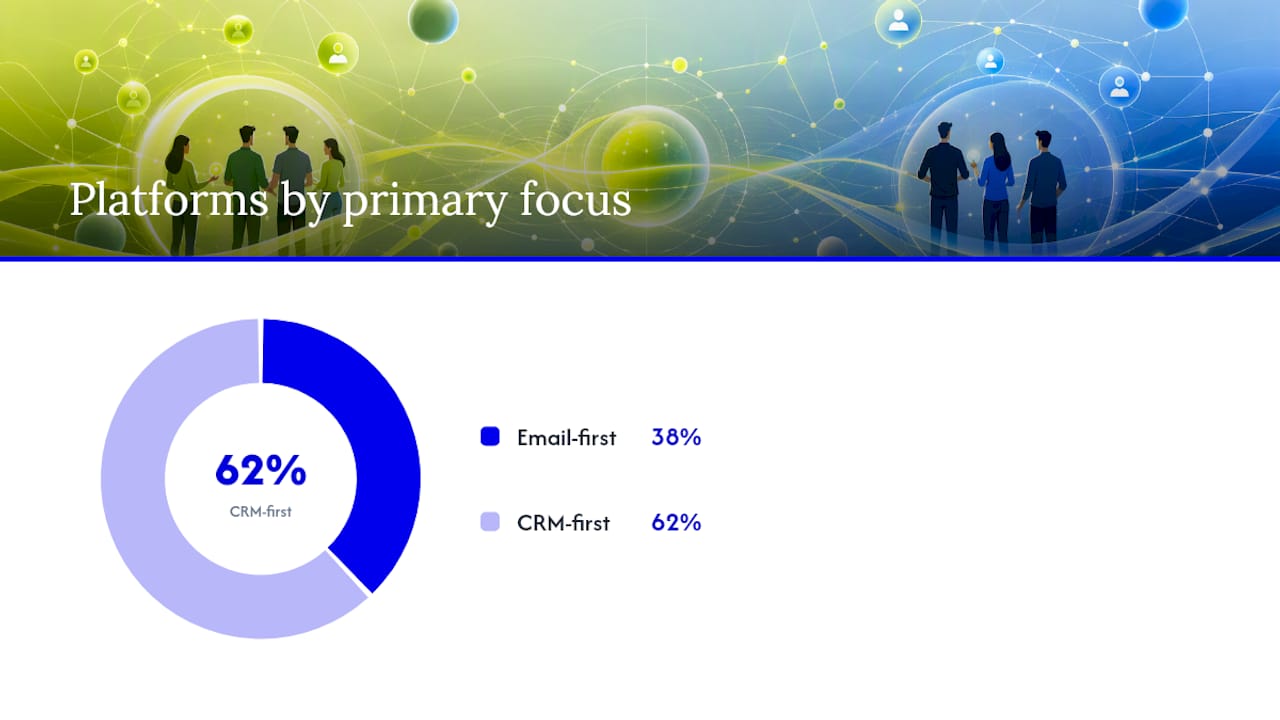
Comparing platforms side by side shows a consistent pattern: email-first tools have added CRM layers, and CRM-first tools have added automation layers, so the real question isn’t “which category” but which one matches your primary bottleneck. An all-in-one platform suits teams wanting speed and low setup overhead. A best-of-breed stack, connected through native integrations or an iPaaS, suits teams whose sales and marketing needs have genuinely outgrown a single vendor’s feature set.
Agency perspective: implementing CRM and automation for a client
Our approach follows a consistent sequence: discovery, funnel mapping, stack selection, data migration, automation build, and team training. For Ray White Aspley, that process focused on tightening the handoff between ad-driven leads and the sales pipeline.
Cutting lead cost isn’t about spending less on ads. It’s about making sure every lead that comes in gets tracked, scored, and followed up before it goes cold.
Discovery and current-state audit
Funnel and handoff mapping
Stack selection matched to team size and budget
Data migration and cleanup
Automation build and lead-scoring setup
Team training and governance handover
A practical note on getting started
Start small: automate the obvious workflow first, like new-lead follow-up, before building anything complex. Govern your data from day one, because messy fields are far harder to fix later than to prevent. Costs scale incrementally, so you don’t need the full stack on day one to see results.
Where Sunstatedigital fits in your CRM and automation decision
Sunstatedigital gives you a strategy-first alternative to guessing your way through vendor comparisons: we map your funnel and sales process before recommending a single platform, so you’re not paying for automation features you’ll never use or a CRM that can’t scale with your pipeline.
We handle the parts most businesses get stuck on: discovery, stack selection, data migration, automation build, and staff training, all delivered as one connected system rather than separate projects. That’s the same approach behind results like the lead cost reduction we achieved for Ray White Aspley, and it applies whether you need a CRM, a marketing automation platform, or both integrated properly from the start. If you’re weighing up a rebuild alongside your CRM decision, our website design and development work often ties directly into the same lead-tracking setup.
If you’re ready to stop guessing which platform fits your business, book a discovery session through our CRM and automation services page and we’ll map out exactly what you need before you spend a dollar on software.
Sources
Recommended
Stay Inspired
Get fresh design insights, articles, and resources delivered straight to your inbox.
Latest Blogs



Stay Inspired
Get fresh design insights, articles, and resources delivered straight to your inbox.
Insights
Aug 17, 2026
CRM vs marketing automation: what to use and when
CRM vs marketing automation: what to use and when
Discover when to use CRM or marketing automation to enhance relationships, streamline sales, and effectively nurture leads at scale.
Discover when to use CRM or marketing automation to enhance relationships, streamline sales, and effectively nurture leads at scale.
CRM vs marketing automation: what to use and when
CRM manages one-to-one relationships and sales pipelines. Marketing automation manages one-to-many campaigns that capture and nurture leads at scale. If your business needs to forecast revenue, manage a multi-step sales process, or keep reps accountable, start with a CRM. If you need to nurture hundreds or thousands of contacts with minimal manual effort, start with marketing automation. Most growing businesses eventually need both, connected so a handoff from marketing to sales carries full context, not a cold contact record.
The decision usually comes down to what’s breaking right now. If deals are falling through the cracks because nobody logged the last call, that’s a CRM problem tied to pipeline forecasting and close rates. If leads are going cold because nobody has time to send a follow-up email, that’s a marketing automation problem tied to lead-to-opportunity conversion.
CRM = relationship history, deal stages, forecasting, one-to-one follow-up
Marketing automation = campaigns, segmentation, triggered workflows, one-to-many nurture
Most vendors now price by contact volume or by seat, so your growth pattern (more staff vs bigger database) should shape which model you pick
Add the second tool once the first one hits its ceiling, not before
Key Takeaways
Choosing between CRM and marketing automation comes down to whether your bottleneck is pipeline management or lead-nurture volume, and most growing businesses eventually need both integrated.
Point | Details |
|---|---|
CRM owns the pipeline | Use CRM for one-to-one relationship tracking, deal stages, and revenue forecasting. |
Automation owns the nurture | Use marketing automation for one-to-many campaigns, segmentation, and triggered workflows. |
Pricing models diverge | CRMs often charge per seat while automation tools often charge per contact or send volume. |
Integration prevents dropped leads | Sync contact data, engagement history, and lead scoring to avoid duplicate or missed handoffs. |
Sunstatedigital builds the connected system | Sunstatedigital maps your funnel first, then implements CRM, automation, or both as one integrated setup. |
Table of Contents
CRM vs marketing automation: a quick comparison
What is a CRM? Features, users and KPIs explained
What is marketing automation? Capabilities, users and typical workflows
Head-to-head: where CRM and marketing automation diverge
How CRM and marketing automation work together
When to pick CRM, marketing automation, or both
How to choose and implement: checklist and pitfalls
Shortlist: platforms that combine CRM and marketing automation
Where Sunstatedigital fits in your CRM and automation decision
Sources
CRM vs marketing automation: a quick comparison
A CRM is where your sales and service teams live day to day, tracking every interaction with a named person or account. Marketing automation is where your marketing team designs and runs campaigns that reach many contacts at once, based on rules and triggers rather than individual judgement calls.
CRM focuses on tracking clients and sales, while marketing automation focuses on running campaigns and nurturing leads, and that split shows up in every feature comparison worth reading.
Dimension | CRM | Marketing automation |
|---|---|---|
Best for | Sales teams managing deals and accounts | Marketing teams nurturing large contact lists |
Core capabilities | Pipelines, contact records, forecasting | Campaigns, segmentation, triggered workflows |
Ease of use | Moderate, needs sales process discipline | Moderate, needs campaign and content setup |
Pricing shape | Often per seat/user | Often per contact or send volume |
Integrations | Connects to email, calendars, support tools | Connects to CRM, ecommerce, ad platforms |
Scalability | Scales with headcount and deal complexity | Scales with contact list size |
Reporting | Pipeline value, close rate, forecast accuracy | Open rate, click rate, conversion rate |
The single biggest deciding factor for a CRM is whether you need to forecast revenue from a multi-stage pipeline. For marketing automation, it’s whether you’re trying to reach volume that no human could personally follow up on.
What is a CRM? Features, users and KPIs explained
A customer relationship management (CRM) system is the record of every interaction a person or company has had with your business: calls, meetings, emails, purchases, support tickets. A CRM stores this full relationship history and acts as the single source of truth for pipeline and forecasting, which is why sales leaders treat it as non-negotiable once a business has more than one or two salespeople.
Core CRM features typically include:
Contact and account records with a full activity timeline
Deal or opportunity pipelines with defined stages
Task and follow-up management for reps
Revenue forecasting based on pipeline stage and probability
Reporting on close rates and time-to-close
Sales, account management, and support teams are the primary users. They track pipeline value, close rate, time-to-close, and customer lifetime value as their core KPIs. A CRM becomes the right first investment when your sales process has multiple steps, when more than one rep is working the same pipeline, or when leadership needs a reliable forecast rather than a gut feeling.
Pro Tip: If you can’t currently answer “how many deals will close this month, and for how much?” with confidence, that’s the clearest sign you need a CRM before you need anything else.
Businesses selling high-value services, real estate, B2B contracts, or anything with a negotiation cycle almost always need a CRM before they need a marketing automation platform. The sales process itself is the bottleneck, not lead volume.
What is marketing automation? Capabilities, users and typical workflows
Marketing automation software runs campaigns and nurtures leads without a human sending each message manually. These platforms are built for one-to-many communication at scale, covering campaign design, audience segmentation, deliverability, and analytics.
Core capabilities include:
Campaign and email design tools
Audience segmentation based on behaviour or attributes
Triggered workflows (an action starts a sequence automatically)
Deliverability management to keep emails out of spam
Analytics on opens, clicks, and conversions
Marketing, ecommerce, and growth teams are the primary users, tracking lead volume, open and click rates, conversion rate, and MQL-to-SQL rate (how many marketing-qualified leads become sales-qualified).
Two workflows show this in practice:
Welcome series: a new subscriber joins your list, triggers a sequence of three to five emails over two weeks introducing your product, then hands off to a promotional campaign.
Abandoned cart or demo nurture: a visitor starts checkout or books a demo but doesn’t convert, triggering a reminder sequence timed over several days with escalating incentives or content.
Neither workflow needs a human to intervene at every step, which is precisely the point. Marketing automation exists to handle volume that would otherwise overwhelm a sales team’s inbox.
Head-to-head: where CRM and marketing automation diverge
The two systems diverge on purpose, data ownership, funnel stage, and who’s actually using them day to day.
Purpose: CRM manages individual relationships through to close; marketing automation manages audiences through to engagement.
Data owned: CRM owns deal stage, contact history, and account details. Marketing automation owns campaign engagement, segment membership, and behavioural triggers.
Funnel stage: Marketing automation typically dominates top-of-funnel and nurture; CRM dominates mid-to-bottom funnel once a lead is sales-ready.
Primary users: Marketers run automation; sales and account managers run CRM.
Personalisation: CRM personalises one-to-one, built around a single rep’s relationship with a single contact. Marketing automation personalises one-to-many, using segments and rules rather than individual judgement.
Approach | Strength | Trade-off |
|---|---|---|
CRM alone | Tight sales process, accurate forecasting | No scalable way to nurture cold or early-stage leads |
Marketing automation alone | Efficient nurture at volume | No structured pipeline for complex, multi-step sales |
Both, integrated | Full-funnel visibility, smoother handoffs | More setup and governance required |
The most common failure isn’t picking the wrong tool. It’s automating so aggressively that a lead gets three different messages from marketing and sales in the same afternoon, because nobody defined who owns the handoff.
Pro Tip: Before switching on any automated sequence, write down exactly which team owns a lead at each funnel stage. Over-automation without clear handoff rules is the single most common misconfiguration we see in integrated setups.
How CRM and marketing automation work together
Three integration patterns cover almost every business setup.
Native all-in-one platform: CRM and marketing automation live in the same system, sharing one database by default. Fastest to set up, least flexible if you outgrow either half.
Two-tool sync via API or connector: separate best-of-breed tools, connected through native integrations or a connector, syncing contact and activity data both ways.
Hub approach using an iPaaS or middleware: a platform like Boomi sits between multiple systems, routing data where each tool needs it. Useful once you’re running more than two or three connected platforms.
The handoff workflow that matters most looks like this: a lead is captured through a form or ad, scored based on engagement, qualified once it crosses a threshold, routed to a sales rep for outreach, and then tracked through to conversion inside the CRM.
When two tools run separately, the critical sync points are contact data, email engagement feeding into the CRM timeline, and lead-scoring triggers that prevent the same lead being contacted twice or missed entirely. A clear handoff improves conversion because sales gets context, such as email opens, clicks, and downloads, before making the first call.
Pro Tip: Keep your lead-scoring model in one place, not duplicated across both systems. If marketing scores leads one way and sales re-scores them differently, you’ll end up with two conflicting priority lists and neither team trusts the number.
When to pick CRM, marketing automation, or both
Your scenario determines the starting point more than any feature comparison ever will.
Solo founder: start with a lightweight CRM to track relationships; add automation once you’re sending regular content to a growing list.
Small sales team (2-10 reps): CRM first, focused on pipeline visibility and forecasting.
Ecommerce store: marketing automation first, focused on cart recovery, welcome series, and post-purchase flows.
Growing SME (10-50 people): both, integrated, because sales and marketing are large enough to need a formal handoff.
Enterprise: both, often via a hub approach, with dedicated governance over data fields and scoring models.
Before committing, run through this checklist:
Do you need to forecast revenue from a multi-stage pipeline? If yes, CRM is essential.
Do you need to reach hundreds or thousands of contacts without manual follow-up? If yes, marketing automation is essential.
Do both teams need shared visibility into the same contact? If yes, plan for integration from day one rather than bolting it on later.
How to choose and implement: checklist and pitfalls
Picking the right platform is only half the job. Implementation is where most of the cost and risk actually sits.
Run through this selection process before signing anything:
Define the outcome you need in the next 90 days (faster close rate, more qualified leads, unified reporting).
Map the features that outcome actually requires, not every feature the vendor demos.
Estimate cost under both contact-based and seat-based pricing, since CRMs often charge per seat while marketing automation tools often charge per contact or send volume, and the cheaper option depends on whether your headcount or your database grows faster.
Check native integrations before assuming you’ll need custom connector work.
Trial the two or three workflows you’ll actually use daily, not the full feature list.
On pricing, watch for three cost traps: bundled platforms with free CRM tiers offer an easy on-ramp for small teams but often become significantly more expensive at higher tiers or as contact counts grow; add-on costs for SMS, deliverability tools, or premium support can add up fast; and migration costs are frequently underestimated, especially when historical deal data needs cleaning first.
Common pitfalls to avoid:
Uncontrolled custom fields that different team members create without any naming standard
Duplicate contacts from imports that were never deduplicated before go-live
No governance policy on who can edit deal stages or trigger automated sequences
Hidden or unstructured data that undermines both automation and reporting accuracy, a risk Gartner flags in its coverage of dark data
Pro Tip: Before you buy anything, map your required data fields and minimum viable sync points on a whiteboard. It takes an hour and saves weeks of retrofitting integrations later.
Shortlist: platforms that combine CRM and marketing automation
Here’s how the major players stack up, based on who they suit best rather than a strict ranking.
HubSpot built its reputation on a genuinely usable free CRM tier, and that free tier gives small teams an easy on-ramp before costs climb at higher plans. It’s strong for businesses wanting CRM and marketing automation under one roof without early integration work.
ActiveCampaign started as an email automation tool and added CRM features over time. It suits small teams whose primary need is scalable email nurture rather than a complex multi-stage sales pipeline.
Zoho CRM is part of a much larger business suite, which makes it a sensible pick for businesses already using other Zoho products and wanting tight integration across finance, support, and sales.
Pipedrive is built sales-first, with a visual pipeline that reps actually enjoy using. It’s a strong choice when forecasting and deal visibility matter more than campaign sophistication.
Freshsales, part of Freshworks, blends CRM with built-in AI-assisted lead scoring, suiting teams that want automation intelligence without stitching together separate tools.
Monday.com approaches CRM from a project-management angle, which works well for teams that already run their operations on Monday boards and want sales data in the same place.
Brevo (formerly Sendinblue) leans into email and SMS marketing automation with CRM features layered on, making it a cost-effective option for contact-heavy, budget-conscious teams.
GetResponse is another email-first platform with automation and landing page tools built in, suiting solo operators and small marketing teams running campaigns without a dedicated sales pipeline.
Platform | Best for | Pricing starting point | Scalability |
|---|---|---|---|
HubSpot | All-in-one CRM + automation | Free tier, paid plans scale up | SMB to enterprise |
ActiveCampaign | Email-first automation | Paid, contact-based | SMB to mid-market |
Zoho CRM | Businesses on the Zoho suite | Free tier, paid plans scale up | SMB to enterprise |
Pipedrive | Sales-first pipeline visibility | Paid, seat-based | SMB to mid-market |
Freshsales | AI-assisted lead scoring | Free tier, paid plans scale up | SMB to mid-market |
Monday.com | Teams already using Monday | Paid, seat-based | SMB to mid-market |
Brevo | Contact-heavy, budget-conscious teams | Free tier, paid plans scale up | SMB |
GetResponse | Solo operators, email-first marketing | Paid, contact-based | SMB |
Comparing platforms side by side shows a consistent pattern: email-first tools have added CRM layers, and CRM-first tools have added automation layers, so the real question isn’t “which category” but which one matches your primary bottleneck. An all-in-one platform suits teams wanting speed and low setup overhead. A best-of-breed stack, connected through native integrations or an iPaaS, suits teams whose sales and marketing needs have genuinely outgrown a single vendor’s feature set.
Agency perspective: implementing CRM and automation for a client
Our approach follows a consistent sequence: discovery, funnel mapping, stack selection, data migration, automation build, and team training. For Ray White Aspley, that process focused on tightening the handoff between ad-driven leads and the sales pipeline.
Cutting lead cost isn’t about spending less on ads. It’s about making sure every lead that comes in gets tracked, scored, and followed up before it goes cold.
Discovery and current-state audit
Funnel and handoff mapping
Stack selection matched to team size and budget
Data migration and cleanup
Automation build and lead-scoring setup
Team training and governance handover
A practical note on getting started
Start small: automate the obvious workflow first, like new-lead follow-up, before building anything complex. Govern your data from day one, because messy fields are far harder to fix later than to prevent. Costs scale incrementally, so you don’t need the full stack on day one to see results.
Where Sunstatedigital fits in your CRM and automation decision
Sunstatedigital gives you a strategy-first alternative to guessing your way through vendor comparisons: we map your funnel and sales process before recommending a single platform, so you’re not paying for automation features you’ll never use or a CRM that can’t scale with your pipeline.
We handle the parts most businesses get stuck on: discovery, stack selection, data migration, automation build, and staff training, all delivered as one connected system rather than separate projects. That’s the same approach behind results like the lead cost reduction we achieved for Ray White Aspley, and it applies whether you need a CRM, a marketing automation platform, or both integrated properly from the start. If you’re weighing up a rebuild alongside your CRM decision, our website design and development work often ties directly into the same lead-tracking setup.
If you’re ready to stop guessing which platform fits your business, book a discovery session through our CRM and automation services page and we’ll map out exactly what you need before you spend a dollar on software.
Sources
Recommended
Stay Inspired
Get fresh design insights, articles, and resources delivered straight to your inbox.
Latest Blogs
Stay Inspired
Get fresh design insights, articles, and resources delivered straight to your inbox.
Insights
Aug 17, 2026
CRM vs marketing automation: what to use and when
CRM vs marketing automation: what to use and when
Discover when to use CRM or marketing automation to enhance relationships, streamline sales, and effectively nurture leads at scale.
Discover when to use CRM or marketing automation to enhance relationships, streamline sales, and effectively nurture leads at scale.
CRM vs marketing automation: what to use and when
CRM manages one-to-one relationships and sales pipelines. Marketing automation manages one-to-many campaigns that capture and nurture leads at scale. If your business needs to forecast revenue, manage a multi-step sales process, or keep reps accountable, start with a CRM. If you need to nurture hundreds or thousands of contacts with minimal manual effort, start with marketing automation. Most growing businesses eventually need both, connected so a handoff from marketing to sales carries full context, not a cold contact record.
The decision usually comes down to what’s breaking right now. If deals are falling through the cracks because nobody logged the last call, that’s a CRM problem tied to pipeline forecasting and close rates. If leads are going cold because nobody has time to send a follow-up email, that’s a marketing automation problem tied to lead-to-opportunity conversion.
CRM = relationship history, deal stages, forecasting, one-to-one follow-up
Marketing automation = campaigns, segmentation, triggered workflows, one-to-many nurture
Most vendors now price by contact volume or by seat, so your growth pattern (more staff vs bigger database) should shape which model you pick
Add the second tool once the first one hits its ceiling, not before
Key Takeaways
Choosing between CRM and marketing automation comes down to whether your bottleneck is pipeline management or lead-nurture volume, and most growing businesses eventually need both integrated.
Point | Details |
|---|---|
CRM owns the pipeline | Use CRM for one-to-one relationship tracking, deal stages, and revenue forecasting. |
Automation owns the nurture | Use marketing automation for one-to-many campaigns, segmentation, and triggered workflows. |
Pricing models diverge | CRMs often charge per seat while automation tools often charge per contact or send volume. |
Integration prevents dropped leads | Sync contact data, engagement history, and lead scoring to avoid duplicate or missed handoffs. |
Sunstatedigital builds the connected system | Sunstatedigital maps your funnel first, then implements CRM, automation, or both as one integrated setup. |
Table of Contents
CRM vs marketing automation: a quick comparison
What is a CRM? Features, users and KPIs explained
What is marketing automation? Capabilities, users and typical workflows
Head-to-head: where CRM and marketing automation diverge
How CRM and marketing automation work together
When to pick CRM, marketing automation, or both
How to choose and implement: checklist and pitfalls
Shortlist: platforms that combine CRM and marketing automation
Where Sunstatedigital fits in your CRM and automation decision
Sources
CRM vs marketing automation: a quick comparison
A CRM is where your sales and service teams live day to day, tracking every interaction with a named person or account. Marketing automation is where your marketing team designs and runs campaigns that reach many contacts at once, based on rules and triggers rather than individual judgement calls.
CRM focuses on tracking clients and sales, while marketing automation focuses on running campaigns and nurturing leads, and that split shows up in every feature comparison worth reading.
Dimension | CRM | Marketing automation |
|---|---|---|
Best for | Sales teams managing deals and accounts | Marketing teams nurturing large contact lists |
Core capabilities | Pipelines, contact records, forecasting | Campaigns, segmentation, triggered workflows |
Ease of use | Moderate, needs sales process discipline | Moderate, needs campaign and content setup |
Pricing shape | Often per seat/user | Often per contact or send volume |
Integrations | Connects to email, calendars, support tools | Connects to CRM, ecommerce, ad platforms |
Scalability | Scales with headcount and deal complexity | Scales with contact list size |
Reporting | Pipeline value, close rate, forecast accuracy | Open rate, click rate, conversion rate |
The single biggest deciding factor for a CRM is whether you need to forecast revenue from a multi-stage pipeline. For marketing automation, it’s whether you’re trying to reach volume that no human could personally follow up on.
What is a CRM? Features, users and KPIs explained
A customer relationship management (CRM) system is the record of every interaction a person or company has had with your business: calls, meetings, emails, purchases, support tickets. A CRM stores this full relationship history and acts as the single source of truth for pipeline and forecasting, which is why sales leaders treat it as non-negotiable once a business has more than one or two salespeople.
Core CRM features typically include:
Contact and account records with a full activity timeline
Deal or opportunity pipelines with defined stages
Task and follow-up management for reps
Revenue forecasting based on pipeline stage and probability
Reporting on close rates and time-to-close
Sales, account management, and support teams are the primary users. They track pipeline value, close rate, time-to-close, and customer lifetime value as their core KPIs. A CRM becomes the right first investment when your sales process has multiple steps, when more than one rep is working the same pipeline, or when leadership needs a reliable forecast rather than a gut feeling.
Pro Tip: If you can’t currently answer “how many deals will close this month, and for how much?” with confidence, that’s the clearest sign you need a CRM before you need anything else.
Businesses selling high-value services, real estate, B2B contracts, or anything with a negotiation cycle almost always need a CRM before they need a marketing automation platform. The sales process itself is the bottleneck, not lead volume.
What is marketing automation? Capabilities, users and typical workflows
Marketing automation software runs campaigns and nurtures leads without a human sending each message manually. These platforms are built for one-to-many communication at scale, covering campaign design, audience segmentation, deliverability, and analytics.
Core capabilities include:
Campaign and email design tools
Audience segmentation based on behaviour or attributes
Triggered workflows (an action starts a sequence automatically)
Deliverability management to keep emails out of spam
Analytics on opens, clicks, and conversions
Marketing, ecommerce, and growth teams are the primary users, tracking lead volume, open and click rates, conversion rate, and MQL-to-SQL rate (how many marketing-qualified leads become sales-qualified).
Two workflows show this in practice:
Welcome series: a new subscriber joins your list, triggers a sequence of three to five emails over two weeks introducing your product, then hands off to a promotional campaign.
Abandoned cart or demo nurture: a visitor starts checkout or books a demo but doesn’t convert, triggering a reminder sequence timed over several days with escalating incentives or content.
Neither workflow needs a human to intervene at every step, which is precisely the point. Marketing automation exists to handle volume that would otherwise overwhelm a sales team’s inbox.
Head-to-head: where CRM and marketing automation diverge
The two systems diverge on purpose, data ownership, funnel stage, and who’s actually using them day to day.
Purpose: CRM manages individual relationships through to close; marketing automation manages audiences through to engagement.
Data owned: CRM owns deal stage, contact history, and account details. Marketing automation owns campaign engagement, segment membership, and behavioural triggers.
Funnel stage: Marketing automation typically dominates top-of-funnel and nurture; CRM dominates mid-to-bottom funnel once a lead is sales-ready.
Primary users: Marketers run automation; sales and account managers run CRM.
Personalisation: CRM personalises one-to-one, built around a single rep’s relationship with a single contact. Marketing automation personalises one-to-many, using segments and rules rather than individual judgement.
Approach | Strength | Trade-off |
|---|---|---|
CRM alone | Tight sales process, accurate forecasting | No scalable way to nurture cold or early-stage leads |
Marketing automation alone | Efficient nurture at volume | No structured pipeline for complex, multi-step sales |
Both, integrated | Full-funnel visibility, smoother handoffs | More setup and governance required |
The most common failure isn’t picking the wrong tool. It’s automating so aggressively that a lead gets three different messages from marketing and sales in the same afternoon, because nobody defined who owns the handoff.
Pro Tip: Before switching on any automated sequence, write down exactly which team owns a lead at each funnel stage. Over-automation without clear handoff rules is the single most common misconfiguration we see in integrated setups.
How CRM and marketing automation work together
Three integration patterns cover almost every business setup.
Native all-in-one platform: CRM and marketing automation live in the same system, sharing one database by default. Fastest to set up, least flexible if you outgrow either half.
Two-tool sync via API or connector: separate best-of-breed tools, connected through native integrations or a connector, syncing contact and activity data both ways.
Hub approach using an iPaaS or middleware: a platform like Boomi sits between multiple systems, routing data where each tool needs it. Useful once you’re running more than two or three connected platforms.
The handoff workflow that matters most looks like this: a lead is captured through a form or ad, scored based on engagement, qualified once it crosses a threshold, routed to a sales rep for outreach, and then tracked through to conversion inside the CRM.
When two tools run separately, the critical sync points are contact data, email engagement feeding into the CRM timeline, and lead-scoring triggers that prevent the same lead being contacted twice or missed entirely. A clear handoff improves conversion because sales gets context, such as email opens, clicks, and downloads, before making the first call.
Pro Tip: Keep your lead-scoring model in one place, not duplicated across both systems. If marketing scores leads one way and sales re-scores them differently, you’ll end up with two conflicting priority lists and neither team trusts the number.
When to pick CRM, marketing automation, or both
Your scenario determines the starting point more than any feature comparison ever will.
Solo founder: start with a lightweight CRM to track relationships; add automation once you’re sending regular content to a growing list.
Small sales team (2-10 reps): CRM first, focused on pipeline visibility and forecasting.
Ecommerce store: marketing automation first, focused on cart recovery, welcome series, and post-purchase flows.
Growing SME (10-50 people): both, integrated, because sales and marketing are large enough to need a formal handoff.
Enterprise: both, often via a hub approach, with dedicated governance over data fields and scoring models.
Before committing, run through this checklist:
Do you need to forecast revenue from a multi-stage pipeline? If yes, CRM is essential.
Do you need to reach hundreds or thousands of contacts without manual follow-up? If yes, marketing automation is essential.
Do both teams need shared visibility into the same contact? If yes, plan for integration from day one rather than bolting it on later.
How to choose and implement: checklist and pitfalls
Picking the right platform is only half the job. Implementation is where most of the cost and risk actually sits.
Run through this selection process before signing anything:
Define the outcome you need in the next 90 days (faster close rate, more qualified leads, unified reporting).
Map the features that outcome actually requires, not every feature the vendor demos.
Estimate cost under both contact-based and seat-based pricing, since CRMs often charge per seat while marketing automation tools often charge per contact or send volume, and the cheaper option depends on whether your headcount or your database grows faster.
Check native integrations before assuming you’ll need custom connector work.
Trial the two or three workflows you’ll actually use daily, not the full feature list.
On pricing, watch for three cost traps: bundled platforms with free CRM tiers offer an easy on-ramp for small teams but often become significantly more expensive at higher tiers or as contact counts grow; add-on costs for SMS, deliverability tools, or premium support can add up fast; and migration costs are frequently underestimated, especially when historical deal data needs cleaning first.
Common pitfalls to avoid:
Uncontrolled custom fields that different team members create without any naming standard
Duplicate contacts from imports that were never deduplicated before go-live
No governance policy on who can edit deal stages or trigger automated sequences
Hidden or unstructured data that undermines both automation and reporting accuracy, a risk Gartner flags in its coverage of dark data
Pro Tip: Before you buy anything, map your required data fields and minimum viable sync points on a whiteboard. It takes an hour and saves weeks of retrofitting integrations later.
Shortlist: platforms that combine CRM and marketing automation
Here’s how the major players stack up, based on who they suit best rather than a strict ranking.
HubSpot built its reputation on a genuinely usable free CRM tier, and that free tier gives small teams an easy on-ramp before costs climb at higher plans. It’s strong for businesses wanting CRM and marketing automation under one roof without early integration work.
ActiveCampaign started as an email automation tool and added CRM features over time. It suits small teams whose primary need is scalable email nurture rather than a complex multi-stage sales pipeline.
Zoho CRM is part of a much larger business suite, which makes it a sensible pick for businesses already using other Zoho products and wanting tight integration across finance, support, and sales.
Pipedrive is built sales-first, with a visual pipeline that reps actually enjoy using. It’s a strong choice when forecasting and deal visibility matter more than campaign sophistication.
Freshsales, part of Freshworks, blends CRM with built-in AI-assisted lead scoring, suiting teams that want automation intelligence without stitching together separate tools.
Monday.com approaches CRM from a project-management angle, which works well for teams that already run their operations on Monday boards and want sales data in the same place.
Brevo (formerly Sendinblue) leans into email and SMS marketing automation with CRM features layered on, making it a cost-effective option for contact-heavy, budget-conscious teams.
GetResponse is another email-first platform with automation and landing page tools built in, suiting solo operators and small marketing teams running campaigns without a dedicated sales pipeline.
Platform | Best for | Pricing starting point | Scalability |
|---|---|---|---|
HubSpot | All-in-one CRM + automation | Free tier, paid plans scale up | SMB to enterprise |
ActiveCampaign | Email-first automation | Paid, contact-based | SMB to mid-market |
Zoho CRM | Businesses on the Zoho suite | Free tier, paid plans scale up | SMB to enterprise |
Pipedrive | Sales-first pipeline visibility | Paid, seat-based | SMB to mid-market |
Freshsales | AI-assisted lead scoring | Free tier, paid plans scale up | SMB to mid-market |
Monday.com | Teams already using Monday | Paid, seat-based | SMB to mid-market |
Brevo | Contact-heavy, budget-conscious teams | Free tier, paid plans scale up | SMB |
GetResponse | Solo operators, email-first marketing | Paid, contact-based | SMB |
Comparing platforms side by side shows a consistent pattern: email-first tools have added CRM layers, and CRM-first tools have added automation layers, so the real question isn’t “which category” but which one matches your primary bottleneck. An all-in-one platform suits teams wanting speed and low setup overhead. A best-of-breed stack, connected through native integrations or an iPaaS, suits teams whose sales and marketing needs have genuinely outgrown a single vendor’s feature set.
Agency perspective: implementing CRM and automation for a client
Our approach follows a consistent sequence: discovery, funnel mapping, stack selection, data migration, automation build, and team training. For Ray White Aspley, that process focused on tightening the handoff between ad-driven leads and the sales pipeline.
Cutting lead cost isn’t about spending less on ads. It’s about making sure every lead that comes in gets tracked, scored, and followed up before it goes cold.
Discovery and current-state audit
Funnel and handoff mapping
Stack selection matched to team size and budget
Data migration and cleanup
Automation build and lead-scoring setup
Team training and governance handover
A practical note on getting started
Start small: automate the obvious workflow first, like new-lead follow-up, before building anything complex. Govern your data from day one, because messy fields are far harder to fix later than to prevent. Costs scale incrementally, so you don’t need the full stack on day one to see results.
Where Sunstatedigital fits in your CRM and automation decision
Sunstatedigital gives you a strategy-first alternative to guessing your way through vendor comparisons: we map your funnel and sales process before recommending a single platform, so you’re not paying for automation features you’ll never use or a CRM that can’t scale with your pipeline.
We handle the parts most businesses get stuck on: discovery, stack selection, data migration, automation build, and staff training, all delivered as one connected system rather than separate projects. That’s the same approach behind results like the lead cost reduction we achieved for Ray White Aspley, and it applies whether you need a CRM, a marketing automation platform, or both integrated properly from the start. If you’re weighing up a rebuild alongside your CRM decision, our website design and development work often ties directly into the same lead-tracking setup.
If you’re ready to stop guessing which platform fits your business, book a discovery session through our CRM and automation services page and we’ll map out exactly what you need before you spend a dollar on software.
Sources
Recommended
Stay Inspired
Get fresh design insights, articles, and resources delivered straight to your inbox.
Latest Blogs
Stay Inspired
Get fresh design insights, articles, and resources delivered straight to your inbox.