
Use AI to assist customer enquiries with clear privacy controls, approved answers and human handoffs. A practical guide for Australian business owners.
By Joshua Reti

AI can help sort customer enquiries, summarise messages and draft answers from information your business has approved. Begin with a narrow task and human review before allowing automatic replies. A useful setup connects marketing automation with CRM ownership, a clear response process, accessible website information and outcome measurement. Keep tailored pricing, complaints, sensitive situations and uncertain facts with a person. Whether the system is answering or assisting, your business needs clear boundaries, privacy checks and a reliable route to human help. [1],[3]
TL;DR
- Start with classification or draft replies, with human approval.
- Use approved information and escalate unknowns.
- Map data collection, access, storage and deletion before launch.
- Make direct AI interactions clear and human help easy to reach.
- Judge accuracy and completed handoffs alongside response time.
If enquiries are getting lost between inboxes, talk to Sun State Digital about the process first. We can scope enquiry-routing automation, organise CRM stages, review website entry points and build a useful measurement plan. The starting point is understanding where customers wait and what your team needs to give them a considered answer, rather than adding another tool without a clear purpose.
In this article
- Start with one useful task
- Design the handoff before the reply
- Keep consequential answers with a person
- Map the customer information
- Protect accuracy and customer control
- Test the journey and measure the result
- Before you switch it on
- Frequently asked questions
- Build a useful first workflow
- Recommended reading
- References and sources
Start with one useful task
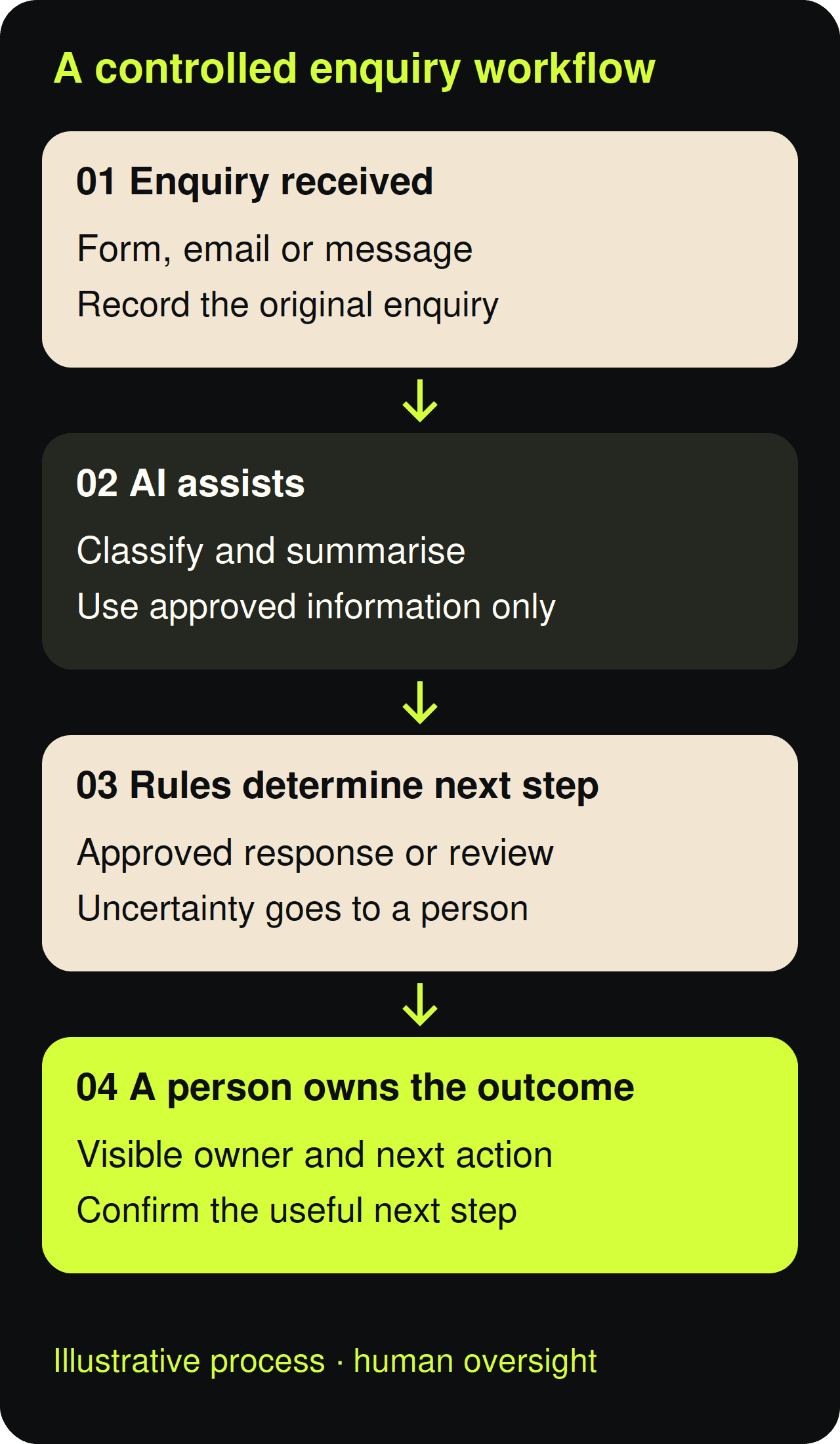
Choose a task with a clear finish line: identifying the requested service, preparing a summary or drafting an acknowledgement. Your CRM and automation plan should show who acts next, while workflow mapping defines the trigger and exception. Keep lead response ownership visible in the customer record, then use marketing reporting to check whether the change helped. Current National AI Centre guidance organises responsible adoption around six essential practices; it is practical guidance, not a replacement for applicable law. [3]
A sensible hypothetical pilot is an internal assistant that categorises new enquiries and suggests a response for staff approval. The website form collects what is needed, the CRM pipeline assigns an owner and the follow-up workflow creates a task. The team follows the response procedure and checks the effect through return-on-investment reporting. This gives you a bounded experiment without assuming that AI should send messages, make bookings or decide which customers deserve attention.
Design the handoff before the reply
Preserve the original message alongside any AI summary, and distinguish customer statements from machine interpretation. A connected CRM should hold the owner and next action, with routing automation handling predictable steps. Your lead-response process needs an escalation route when information is missing, while workflow documentation explains the rules and tracking reveals failed handoffs. If an integration stops working, alert someone and queue the enquiry for review rather than pretending the customer has received a useful answer.
| Enquiry task | Suggested starting point | Human checkpoint |
|---|---|---|
| Service classification | AI suggestion | Uncertain or unmatched category |
| Receipt acknowledgement | Approved fixed wording | Exceptions and failed delivery |
| Tailored price or timing | Staff task with summary | Before any commitment |
| Complaint or sensitive matter | Direct escalation | Person owns the response |
Keep consequential answers with a person
Write explicit limits for prices, availability, refunds and service commitments. The ACCC says business communications must be accurate and based on reasonable grounds, so an invented answer is a business risk even when software produces it. Keep customer-facing information current, set automation boundaries, preserve conversation history, agree a human response route and review the full enquiry journey. An acknowledgement can confirm receipt; it should not imply that a tailored quote, booking or complaint has been resolved. [2]
Map the customer information
Before connecting inboxes or forms, check whether the Privacy Act covers your organisation. The OAIC explains that many small businesses are exempt, but exceptions apply. Treat the following APP discussion as guidance for covered entities, with sensible safeguards for others. Map your website collection points, CRM information, automation connections, reporting access and handoff process. A privacy impact assessment can reveal where information flows, who can access it and whether the proposed use needs to change before implementation. [4],[5],[16]
Collect the minimum information reasonably necessary for the task. A suburb and service type may be enough to route an initial enquiry; a public chatbot should not invite unnecessary sensitive details. Align form design with pipeline requirements, restrict automated data transfers, keep performance reporting proportionate and explain the process during customer follow-up. APP 3 addresses necessary collection, while APP 5 addresses collection notices. A privacy policy and a collection notice serve different purposes, so a footer link alone may not explain a new collection properly. [7],[8],[17]
Check what the AI supplier does with input, output and retained logs, including training use and access by others. OAIC guidance recommends against putting personal or sensitive information into publicly available generative AI tools as best practice. Your CRM integration and automation design should reflect the purpose of collection, supported by clear website explanations, proportionate analytics and documented process responsibilities. APP 6 limits uses and disclosures; APP 8 adds considerations for overseas disclosure. Australian branding does not establish where information is processed. [1],[9],[10]
Set staff access, retention and deletion rules before copying messages into another system. Include the AI provider and backups in that review, rather than cleaning only the visible inbox. Your CRM configuration needs appropriate permissions, your workflow needs a failure path, and reporting should avoid unnecessary customer detail. Connect these decisions to team handover documentation and a clear customer response process. APP 11 addresses security and disposal, subject to retention exceptions; OAIC security guidance supports a lifecycle approach to protecting information. [12],[15]
Protect accuracy and customer control
Use approved service details and prevent the assistant from filling gaps with plausible guesses. Have staff inspect proposed classifications and summaries against the original enquiry, especially before updating a customer record. Accurate CRM records, current website content and well-defined automation rules support the lead-handling process; measurement should record corrections as well as successes. APP 10 concerns information quality, and APPs 12 and 13 address access and correction. Keep those requests reachable by a person rather than trapping customers in an automated loop. [11],[13],[14]
Tell customers when they are interacting directly with AI and provide an obvious way to contact the team. Keep the language understandable on your website, consistent with the CRM journey, supported by human follow-up and reflected in workflow documentation. When designing customer-facing automation, review privacy transparency as well as interface labels. OAIC has published guidance for additional automated-decision privacy-policy obligations commencing 10 December 2026; covered entities should assess relevant uses before then. Human review does not automatically put a decision outside that guidance. [6],[20]

Test the journey and measure the result
Build a small test set covering routine requests, missing details, duplicate submissions, out-of-area work, complaints and deliberate attempts to override the rules. Confirm expected outcomes before testing. Inspect the form experience, CRM assignment, automated action, human notification and event recording together. Start with staff approval of every suggested reply. Only expand permission after the defined task passes your acceptance criteria, and repeat tests when the model, approved information or connected systems change. [3]
Measure first useful human response, summary errors, missed escalations and completed next steps, then relate them to qualified opportunities and work won. Response-time reporting shows delays, CRM stages show progress, analytics support consistent definitions, ROI tracking relates effort to value and automation reviews reveal operational failures. Compare against your own baseline; message volume alone cannot demonstrate success. Use the review to decide whether to adjust the workflow, reduce its permissions or pause it while a problem is investigated.
Give one person accountability for the system and maintain a simple register covering its purpose, approved actions, supplier, data handling, test results and next review. Your automation owner should work with the CRM administrator to keep the process documentation current. Include customer-response responsibilities and performance checks in the handover. The National AI Centre register is a useful starting structure, while OAIC privacy-management guidance reinforces ongoing ownership and evaluation. Neither a register nor a successful launch replaces continued monitoring. [18],[19]
Before you switch it on
- One defined task and accountable owner
- Approved information and prohibited commitments
- Documented data flows, permissions and retention
- Clear AI identification and human contact route
- Test cases, acceptance criteria and correction log
- Failure alerts, manual queue and pause control
- Review date and outcome-based reporting
Frequently asked questions
Should AI send every customer reply automatically?
No. Begin with draft assistance and expand only within tested limits. Workflow design should specify what can be sent, while CRM history records the original enquiry and response. Keep lead ownership visible, maintain consistent service information and use outcome reporting to catch errors. Prices, unusual requests, complaints and sensitive situations deserve human judgement; a fast reply is useful only when it is appropriate and gives the customer a clear next step.
Do I need to replace my existing CRM?
Not necessarily. Review the existing CRM setup and the gap you need to solve before considering migration. The CRM-versus-automation guide separates record keeping from triggered actions, while automation mapping identifies the steps worth connecting. Check the website enquiry path and response ownership as part of that review. A usable system may need clearer stages, permissions or notifications rather than a replacement; a migration needs its own scope and data plan.
Can a privacy disclaimer make any AI use acceptable?
No. A disclaimer cannot replace an assessment of collection, use, security and supplier arrangements. Your website explanation should describe what actually happens, your CRM access should match staff responsibilities, and automation permissions should stay within the approved purpose. Document those decisions in the workflow handover and keep reporting proportionate. Applicable obligations depend on the organisation and use case; obtain qualified privacy advice where the risks or legal position are uncertain. [1],[5]
How do I know whether the workflow is worthwhile?
Look for fewer missed enquiries and corrections, reliable handoffs and useful customer conversations. Combine response-process checks with CRM outcomes, consistent analytics, realistic ROI reporting and periodic automation review. Include setup, staff oversight and ongoing maintenance in the evaluation. Avoid claiming a result from a small or unrepresentative sample, and keep the manual route available so the business can still respond when the software cannot complete its task.
Build a useful first workflow
Start with the enquiry your team handles repeatedly and the point where responsibility becomes unclear. Talk to Josh about mapping a focused automation workflow, organising CRM ownership, improving the website entry point and agreeing the measurement approach. Sun State Digital scopes the work around your existing process and capacity. The objective is a customer journey your team can understand, supervise and improve, with AI assisting where it is genuinely useful and people responsible for the relationship.
Recommended reading
- CRM vs marketing automation: what to use and when
- Speed to lead and response ownership
- Marketing ROI tracking
- Conversion rate optimisation
References and sources
- OAIC · Guidance on privacy and the use of commercially available AI products. Supports: AI due diligence, public tools and personal information.
- ACCC · False or misleading claims. Supports: Accuracy of business communications and commitments.
- National AI Centre · Guidance for AI adoption: implementation guidance. Supports: Defined uses, accountability, transparency, testing and monitoring; non-binding guidance.
- OAIC · Guide to undertaking privacy impact assessments. Supports: Assessing privacy impacts and mapping information flows.
- OAIC · Small business. Supports: Privacy Act coverage and small-business exceptions.
- OAIC · Chapter 1: APP 1 Open and transparent management of personal information. Supports: Current privacy policies and automated-decision transparency guidance commencing 10 December 2026.
- OAIC · Chapter 3: APP 3 Collection of solicited personal information. Supports: Necessary and proportionate collection; updated May 2026.
- OAIC · Chapter 5: APP 5 Notification of the collection of personal information. Supports: Information customers should receive about collection.
- OAIC · Chapter 6: APP 6 Use or disclosure of personal information. Supports: Primary purposes and exceptions for secondary uses.
- OAIC · Chapter 8: APP 8 Cross-border disclosure of personal information. Supports: Overseas recipient due diligence and accountability, subject to exceptions.
- OAIC · Chapter 10: APP 10 Quality of personal information. Supports: Accuracy, currency, completeness and relevance.
- OAIC · Chapter 11: APP 11 Security of personal information. Supports: Security and disposal with retention exceptions.
- OAIC · Chapter 12: APP 12 Access to personal information. Supports: Customer access requests and applicable limits.
- OAIC · Chapter 13: APP 13 Correction of personal information. Supports: Correction requests and quality of held records.
- OAIC · Guide to securing personal information. Supports: Lifecycle security and operational controls; guide is being updated, so read with current APP 11.
- OAIC · Privacy by design. Supports: Considering privacy during design and revisiting assessments when a project changes.
- OAIC · Guide to developing an APP privacy policy. Supports: Business-specific policy explanations and distinction from collection notices; read with current APP 1.
- OAIC · Privacy management framework: enabling compliance and encouraging good practice. Supports: Accountability, training and ongoing evaluation.
- National AI Centre · AI systems register. Supports: Documenting use cases, accountable people and system characteristics.
- National AI Centre · Be clear about AI-generated content. Supports: Proportionate disclosure of AI contribution and impact.